You can connect almost anything to HubSpot.
The hard part isn't whether two systems can talk. It's how.
And that "how" is where most RevOps teams go wrong — overspending on a custom build they didn't need, or duct-taping a revenue-critical data flow with a tool that collapses at scale. This guide fixes that.
Below, you'll get the full spectrum of HubSpot integrations — native connectors, no-code middleware, and custom API builds — plus a simple framework for matching the right option to each connection in your stack.
Let's get into it.
What are HubSpot integrations?
HubSpot integrations connect HubSpot to your other business systems so data flows between them automatically.
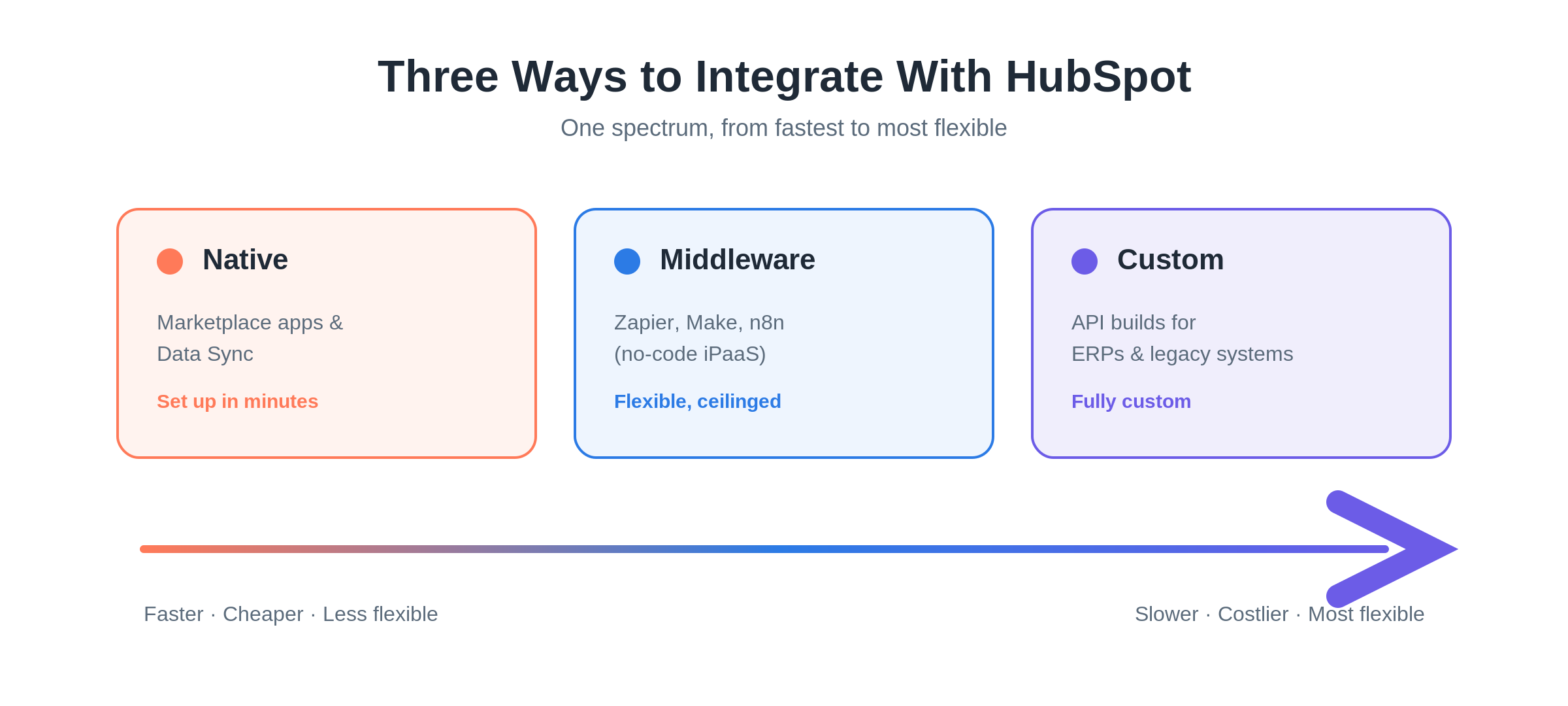
They come in three forms: native connectors from the App Marketplace, no-code middleware (iPaaS) tools like Zapier and Make, and custom API builds for systems nothing else can reach.
Here's the key idea most guides skip:
These aren't competing philosophies. They're a spectrum. A healthy stack usually runs all three at once — native for the standard tools, middleware for the long tail, and custom for the one or two connections your business actually runs on.
The skill is knowing where each connection belongs.
So let's break down all three.
Option 1: Native integrations (the App Marketplace and Data Sync)
Native integrations are the fastest, cheapest place to start.
And for most standard tools, they're the right answer.
Just how big is the App Marketplace?
Big — and growing fast.
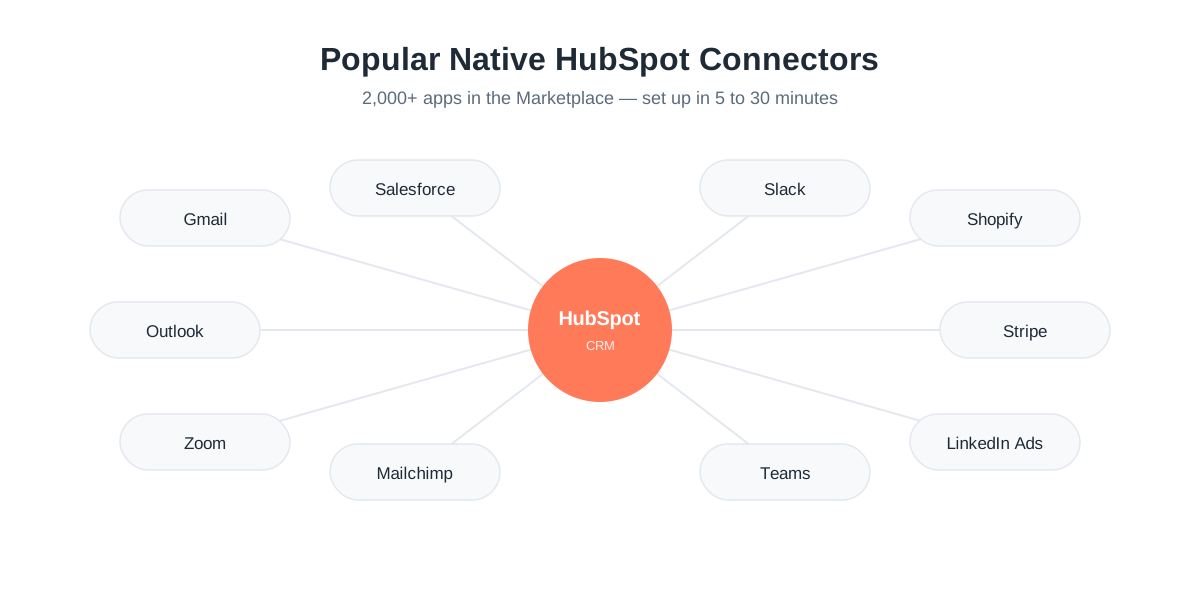
HubSpot's App Marketplace passed 2,000+ apps and 2.5 million active installs as of October 2025. For context, that's up from 1,000 apps in early 2022, and just 500 less than two years before that.
A few numbers worth knowing:
- 40+ categories across HubSpot's six Hubs (Marketing, Sales, Service, Content, Data, and Commerce)
- 95% of customers have installed at least one app
- The average customer uses 9+ apps
What counts as a "native" integration?
A native integration is a pre-built connector — built either by HubSpot or a vetted App Partner — that you set up through a guided OAuth flow.
Setup usually takes 5 to 30 minutes.
The familiar names are all here: Gmail, Outlook, Google Calendar, Salesforce, Slack, Microsoft Teams, Zoom, LinkedIn Ads, Shopify, Mailchimp, and Stripe.
And they go deep:
- Salesforce — bi-directional sync of leads, contacts, accounts, opportunities, and tasks
- Slack — create deals and tasks without leaving the channel
- Stripe — two-way contact and billing sync
You click connect, authorize, choose a few settings, and you're done.
Pro tip: Every listing shows its creator in a "Built by" field. All marketplace apps get a baseline HubSpot review — but a separate HubSpot Certified App badge is earned only by apps that clear a higher bar on security, privacy, reliability, and performance. As of August 2025, certified apps face a two-year recertification cycle, so the badge signals ongoing quality, not a one-time check.
What is HubSpot Data Sync?
HubSpot Data Sync is a native engine inside Data Hub that powers two-way (bi-directional) sync with 100+ apps using point-and-click setup.
It's the engine behind connections to systems like NetSuite, Shopify, and Airtable. (Fun fact: HubSpot acquired it from PieSync back in 2019.)
When you turn on a sync, it builds an internal index of every record and continuously compares states — even recovering dropped or errored API calls.
But here's where you need to be precise, because the word "real-time" gets abused:
Per HubSpot's own docs, Data Sync checks for changes every five minutes, and after the initial sync, records update within 10 minutes of a change. That's reliable and hands-off — but it isn't millisecond-instant.
You pick the direction (two-way, one-way in, or one-way out). The free tier includes two-way sync with default field mappings. Custom field mappings require a paid Data Hub tier (Data Hub Starter is listed around $20/month).
Where do native integrations break down?
Native connectors are brilliant — right up until you need something they weren't built to do.
The limits show up fast:
- You usually can't control which fields sync, change direction beyond the presets, or transform data in transit
- Not every dropdown/picklist syncs both ways (some map only one direction, as plain text)
- Some third-party fields can't be touched because of the other app's API limits
- No custom objects in non-standard ways, and no bespoke business logic
So native is your default. But the moment you need a field it won't map, a custom object, or a tool with no listing at all — you've outgrown it.
And most teams discover that mid-project, after they've already promised a timeline.
Want a second set of eyes before you commit a roadmap? Book an integration audit with Superwork and we'll tell you whether native will actually carry the load.
Option 2: Middleware (Make, n8n, and Zapier)
When a tool has no native connector — or you need a multi-step automation across several apps — middleware is your next stop.
Middleware (also called iPaaS, or integration platform as a service) is a no-code automation layer that connects apps through triggers and actions. All three leaders connect to HubSpot through a native connector plus an HTTP module for anything not pre-built.
But they differ in ways that hit your budget hard.
Zapier — the broadest and easiest (but priciest)
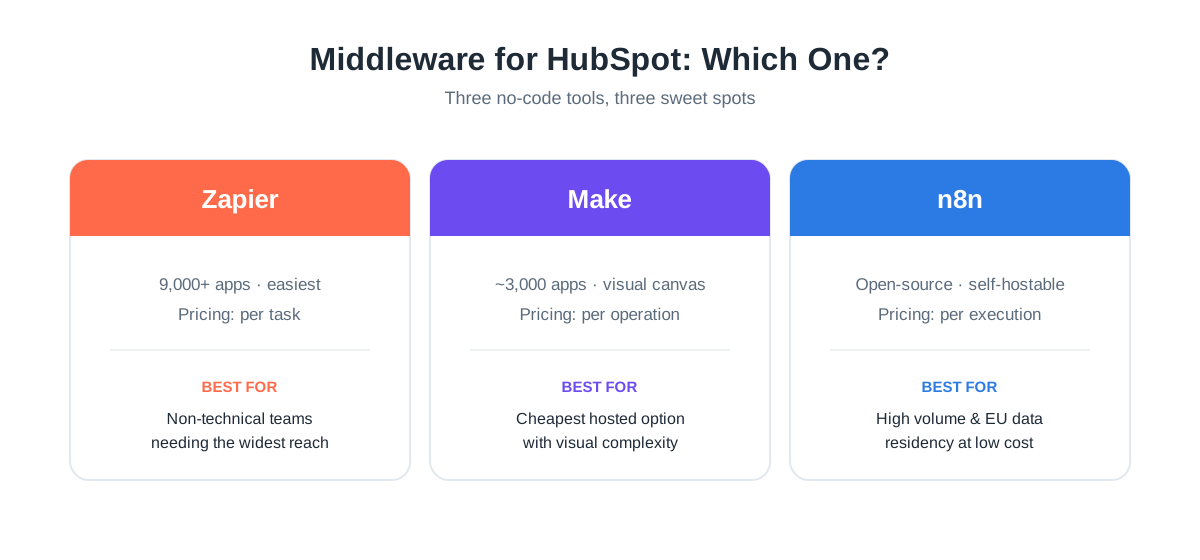
Zapier has the largest ecosystem by far: 9,000+ apps and 30,000+ actions.
Its linear trigger-action builder needs zero training, which makes it the natural pick for non-technical teams. It connects to HubSpot for contacts, companies, deals, custom objects, and more.
So what's the catch?
The pricing model. Zapier charges per task — one task = one action that runs successfully.
- Free: 100 tasks/month, single-step Zaps only
- Professional: from ~$19.99/month (annual) for 750 tasks
That sounds fine. Until you do the math at volume.
A 5-step Zap running 100 times a day burns 15,000 tasks a month — blowing past the Professional allowance in under two days.
Zapier is the easiest. It also gets expensive the fastest.
Make — the cheap, visual workhorse
Make (formerly Integromat) uses a visual canvas instead of a linear list, and it's strong on branching, loops, and parallel paths.
It's the cheapest hosted option — roughly 3,000+ apps plus an HTTP module for any REST API. The HubSpot connector covers contacts, companies, deals, tickets, custom objects, and triggers.
Make charges per operation (rebranded to "credits" in August 2025):
- Free: 1,000 credits/month
- Core: ~$9–$10/month for 10,000 credits
That's 3–5x cheaper per unit than Zapier.
But watch out: a workflow that looks like "three steps" can quietly eat 8 to 15 operations per run. High-frequency scenarios still burn credits quickly.
Make rewards technical users who'll keep an eye on usage.
n8n — open-source and built for scale
n8n is the one that's genuinely different: it's open-source and self-hostable.
It advertises 400+ HubSpot-relevant integrations — fewer pre-built than the others — but its HTTP Request node connects to any REST API, plus it ships first-class AI nodes. The HubSpot node offers 18 triggers and 31 actions.
Note: HubSpot only allows one webhook at a time, so activating a second n8n HubSpot trigger stops the first. Plan around it.
Here's the headline, though — the pricing model:
n8n charges per full workflow execution, not per task or operation. So a single execution can run thousands of steps at no extra cost.
- Cloud Starter: ~€20/month for 2,500 executions
- Self-hosted: the software is free; infra runs ~$50–$150/month for a small setup
Self-hosting gets you total data ownership (a real win for GDPR and EU data residency), unlimited executions, and dramatically lower cost at scale.
The result? Past roughly 50,000 operations a month, self-hosted n8n decisively undercuts both Make and Zapier.
Where does middleware break down?
All three share the same three ceilings:
- Cost scales painfully with volume. The per-task and per-operation models that feel cheap at low volume punish you at high volume.
- Latency is real. Most poll on intervals rather than syncing in true real time, so they run 5 to 30 minutes behind.
- Complexity is the real constraint. Once flows branch, retry, and depend on each other, error handling gets shallow and debugging gets miserable.
Bottom line: middleware is perfect for the long tail and light-to-moderate automation.
It is not where you put the data flow your revenue depends on.
Option 3: Custom integrations (API builds)
Some connections simply have nothing to plug into.
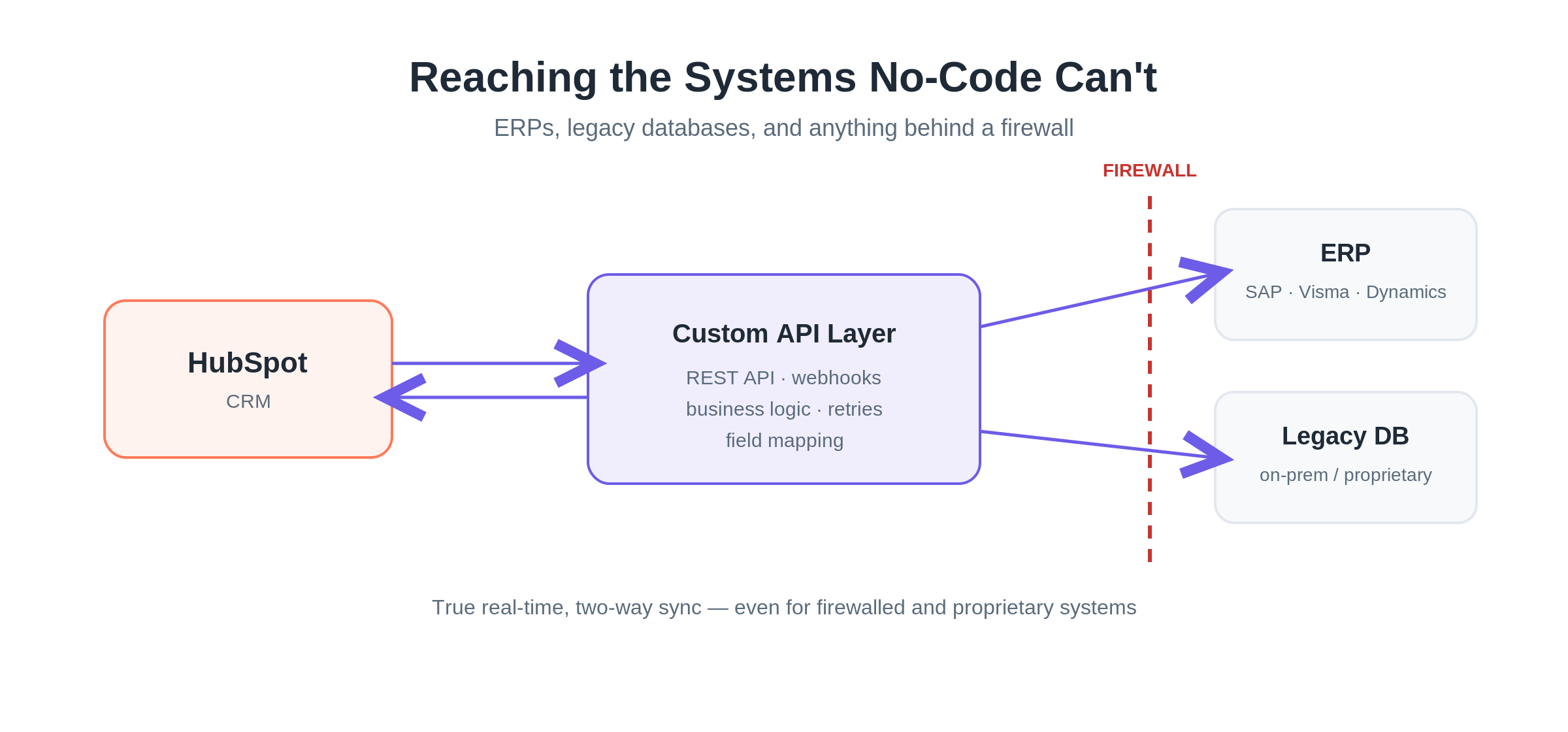
The finance team's ERP. The warehouse system someone wrote fifteen years ago. The proprietary database behind a corporate firewall.
These are exactly the systems no-code tools can't reach — because native connectors, Data Sync, and iPaaS all depend on a pre-built bridge that only exists for popular, cloud-hosted, well-documented software.
When that bridge doesn't exist, you build it.
What does a custom integration unlock?
HubSpot exposes a comprehensive set of REST APIs (the CRM API plus dozens of category-specific ones), reachable through two auth methods:
- Private app access tokens — static bearer tokens, ideal for single-account internal integrations and scheduled jobs
- OAuth 2.0 — for multi-tenant marketplace apps
Custom code is what gives you:
- Custom objects (Enterprise accounts can define up to 10)
- Conditional field mapping and bespoke business logic
- True real-time sync via webhooks
- Connections to legacy, proprietary, and firewalled systems
Data Hub even meets you partway with custom-coded workflow actions — letting you drop JavaScript directly inside a workflow, bridging no-code and full-custom.
What changed in HubSpot's 2026 developer platform?
A few things you'll want to know before scoping a build:
- HubSpot deprecated API key authentication — it's private apps and OAuth only now
- Moved to date-based API versioning, with breaking changes only twice a year (March and September) and an 18-month support window per version
- Shipped serverless functions for UI extensions
- New legacy public app creation is being disabled in mid-2026, with new marketplace apps built on the Projects-based platform
What rate limits should you design around?
Custom builds live and die by rate limits.
For private apps, limits scale with your subscription:
- Free/Starter: 100 requests per 10-second window
- Professional/Enterprise: 190 per 10 seconds
- Daily caps: 650,000 (Pro) and 1,000,000 (Enterprise)
For public OAuth apps: 110 requests per 10 seconds per connected account.
The CRM Search API has a stricter, separate limit — a single search query costs 4 against quota.
Exceed any of these and you get a 429.
The fixes are well-established: use batch endpoints (up to 100 records per call), prefer webhooks over polling, and apply exponential backoff with jitter.
When is a custom build the right call — and what does it cost?
Reach for custom when you're dealing with:
- ERPs (SAP, Dynamics, and the regional systems below)
- Legacy or firewalled systems
- Custom objects
- High record volumes (10,000+ records/day)
- A genuine need for real-time two-way sync rather than overnight polling
Now, the part everyone wants:
Custom HubSpot integrations typically run $15,000 to $150,000 as a one-time build — most land in the $25K–$80K range — with ongoing maintenance of roughly 10–20% of build cost per year. ERP integrations specifically tend to run $10,000–$25,000+.
That maintenance line isn't optional. HubSpot's twice-yearly breaking changes and the third-party system's own API drift mean someone has to keep the integration alive.
This is the layer where partner experience pays for itself — the failure modes are expensive and the API surface is deep.
Weighing a custom build for an ERP or proprietary system? Book a call with Superwork to pressure-test the scope and get a realistic build-and-maintain estimate before you budget for it.
Native vs. middleware vs. custom: a side-by-side comparison
Here's the whole spectrum on one screen:
| Dimension | Native (Marketplace + Data Sync) | Middleware (Make / n8n / Zapier) | Custom (API build) |
|---|---|---|---|
| Time to deploy | Minutes (5–30 min) | Minutes to hours | Weeks (~8 typical) |
| Cost | Included or small add-on; Data Hub from ~$20/mo | $0–$300+/mo, scales with volume | $15K–$150K build + 10–20%/yr |
| Technical skill | Low (admin) | Low–medium (citizen developer) | High (developer/partner) |
| Flexibility | Low — fixed fields/direction | Medium — flexible but ceilinged | Highest — anything the API allows |
| Sync depth | Two-way for supported objects | Mostly polling, event-driven | True real-time, custom objects |
| Maintenance | Vendor-managed | You own the flows | You/partner own it; API churn |
| Best for | Standard cloud tools | Long-tail apps, light volume | ERPs, legacy, custom objects, high volume |
The pattern is clear once it's laid out:
- Native fails the moment you need a field it won't map, a custom object, or a tool with no listing.
- Middleware fails at scale (cost), at real-time requirements (latency), and at complexity (debugging branching flows).
- Custom only "fails" on budget and timeline — it's overkill for a simple Gmail or Slack connection, and exactly right for the connection your revenue runs through.
How a real stack combines all three
The mature answer is a blend:
- Native handles Google Workspace, Slack, and Zoom
- Data Sync covers supported CRMs and e-commerce
- Middleware handles the long tail and event-driven automations
- Custom carries the one or two mission-critical connections — usually an ERP or proprietary system — that nothing else can reach
A common graduation path: validate a process with an iPaaS template, then migrate the high-volume or business-critical logic to custom code once task costs or complexity justify it.
A warning for teams running non-mainstream ERPs
One gap trips up more teams than any other: regional and industry ERPs that the big connector ecosystems don't cover.
The Nordic systems are the clearest example. Visma, Tripletex, PowerOffice Go, and Fortnox — the ERPs that Nordic SMBs actually run — have no first-party HubSpot connectors at all.
Today, that gap gets filled three ways:
- Third-party app vendors building point connectors
- iPaaS templates (Make has HubSpot–PowerOffice modules, for instance)
- Custom builds by regional specialists
If your finance backbone is one of these systems, plan for it early. There's no one-click native path — so assume you'll need either a specialist connector or a custom build.
And engage a partner who already understands the data-model mapping, picklist translation, and local compliance requirements before you start, not mid-project. This is exactly the territory Superwork works in daily, rebuilding Visma and Tripletex integrations on the HubSpot side for Nordic teams.
How to choose: a simple decision framework
Keep this on hand for the next integration request that lands on your desk.
Step 1: Start native, always
For any standard, well-supported cloud tool — Google Workspace, Slack, Zoom, Stripe, Mailchimp, Shopify, Salesforce — use the marketplace connector or Data Sync first.
It's the fastest, cheapest, vendor-maintained option.
Escalate when: you need a field, object, or direction the connector won't support.
Step 2: Reach for middleware for the long tail
When a tool has no native connector, or you need a multi-step, event-driven automation at low-to-moderate volume, use iPaaS.
- Choose Zapier if your team is non-technical and you need the widest app coverage
- Choose Make if you want the cheapest hosted option with visual complexity
- Choose self-hosted n8n if you need EU data residency, high volume, or predictable execution-based cost
Escalate when: monthly task costs climb past ~$200–$300, latency starts to matter, or flows get too complex to debug reliably.
Step 3: Commit to custom for mission-critical connections
ERPs, proprietary or legacy systems, custom objects, high record volume, or true real-time two-way sync all require code.
Budget $15K–$80K for a typical build plus 10–20% a year in maintenance. And lean on a partner who already knows HubSpot's 2026 API versioning rather than asking in-house staff to learn the API on a revenue-critical project.
The trigger: when the connection drives finance, fulfillment, or billing data, staleness and downtime cost real money.
The bottom line
You can integrate virtually anything with HubSpot.
The spectrum runs from a five-minute native install, through flexible no-code middleware, to a fully custom API build for the systems nothing else can touch.
The art of good HubSpot integrations is matching each connection to the right option: native for the standard stuff, middleware for the long tail, and custom for the mission-critical flows your business runs on.
Get that matching right and you dodge both traps — overspending on a build you didn't need, and trusting a fragile no-code flow with data that can't afford to be wrong.
Staring at an integration request and not sure which option it belongs in? Or already know it's a custom ERP job and want it done right the first time?
That's the conversation we have every day. Book an integration audit with Superwork — we'll map your stack, flag the connections sitting on the wrong layer, and give you a clear plan for the ones that need building.
Frequently asked questions about HubSpot integrations
What's the difference between native and custom HubSpot integrations?
Native integrations are pre-built connectors from the HubSpot App Marketplace that you set up in minutes through a guided OAuth flow — but you can't change how they work. Custom integrations are developer-built using HubSpot's REST APIs, so they can handle custom objects, bespoke logic, real-time sync, and systems with no marketplace listing. Native is fastest and cheapest; custom is the most flexible and durable but costs $15K–$150K to build.
How much does a custom HubSpot integration cost?
A custom HubSpot integration typically costs $5,000 to $50,000 as a total cost, but it is highly dependent on the complexity and scope.
Plan for ongoing maintenance of roughly 10–20% of build cost per year, since HubSpot ships breaking API changes twice a year and third-party APIs drift over time. ERP integrations specifically tend to run $10,000–$25,000+.
Can HubSpot integrate with any software?
Practically, yes — the question is how. Popular cloud tools usually have a native connector or Data Sync option. Tools without a connector can be linked through middleware (Zapier, Make, n8n) using an HTTP module. And proprietary, legacy, or firewalled systems require a custom API build. As long as a system has an API or a database you can reach, it can integrate with HubSpot.
Is Zapier or Make better for HubSpot?
Choose Zapier if your team is non-technical and you need the widest app coverage (9,000+ apps) — but expect to pay more, since it charges per task. Choose Make if you want the cheapest hosted option (3–5x cheaper per unit) and don't mind a steeper visual builder. For high volume or EU data residency, self-hosted n8n usually beats both on cost because it charges per workflow execution, not per task.
Does HubSpot have a native ERP integration?
HubSpot's App Marketplace and Data Sync cover major cloud ERPs like NetSuite, but many regional and industry ERPs have no first-party connector. Nordic systems like Visma, Tripletex, PowerOffice Go, and Fortnox, for example, require a third-party app, an iPaaS template, or a custom build. If your ERP isn't a mainstream cloud platform, assume there's no one-click native path.
What is HubSpot Data Sync?
HubSpot Data Sync is a native engine inside Data Hub (formerly Operations Hub) that powers two-way sync with 100+ apps through point-and-click setup. It checks for changes every five minutes and syncs records within 10 minutes of a change. The free tier includes two-way sync with default field mappings; custom field mappings require a paid Data Hub tier.