Are you a HubSpot user who wants to reach high-value target accounts and close bigger deals?
Account-based marketing (ABM) is a B2B sales and marketing strategy designed to target a defined list of accounts, influence multiple stakeholders, and where selling requires personalized content and engagement.
Many companies today rely on content marketing to generate demand for their solutions. This can work well when the sales process is short and transactional, and the target market is massive.
The content is usually generic, and the goal of marketing would be to generate a high volume of leads to pass on to the sales department. However, this strategy is less effective when there are just a small number of target accounts to sell to.
When selling high-value deals, there are multiple people on the buying committee, the sales process is long (ranging from several months or years), and selling to them relies on personalized engagement.
This approach requires more personalized content, an aligned sales and marketing department, and the right tools.
Why use HubSpot for ABM
There are many ABM tools available on the market, from point solutions like LinkedIn and Drift, to marketing automation solutions such as Marketo that offer ABM features.
The problem with building a custom stack of different tools is that they will have multiple points of failure, and data sync issues, and sales and marketing teams do not have the tools they need to collaborate.

HubSpot has been known as an inbound marketing platform and has worked well for targeting specific personas with relevant content. However, HubSpot has now launched new features that will allow you to successfully implement an ABM strategy as well.
HubSpot is now a turnkey solution for companies that want to use account-based marketing to focus on generating revenue by focusing on a defined list of accounts and not just generating a high volume of inbound leads.

Luckily, account-based marketing complements what sales and marketing are already doing. When executing your ABM strategy, you will still use tools you are already using in HubSpot such as smart lists, segmentation, lead scoring, and email marketing.
With the new ABM features, account-based marketing tools are conveniently packaged together in one platform, with a wide selection of integrations ready to go. This means minimal setup time, improved closing rates, and your company gets a single source of truth.
Step 1: Build a sales and marketing team and get buy-in for account-based marketing
The “marketing” in account-based marketing can be misleading since it implies that only the marketing department is involved in executing on an ABM strategy.
To succeed with ABM, sales, and marketing need to be aligned around the same goals, channels, and content. You will need at least one marketer and one salesperson to work together on identifying a list of companies to pursue and create an account plan.
However, getting your sales department to change its behavior and adopt a new approach to selling can be a significant challenge.
How do you do it?
First, you need to focus on the outcomes salespeople can expect from executing a strategy such as account-based marketing, and communicate how ABM can help them talk to more highly qualified leads, bigger deals, and shorter sales processes.
Second, involve your salespeople and get their input from the start. Sales will give valuable input when creating an account plan and target account list, and they will be motivated to see the strategy to succeed.
Third, create a budget. One of the big benefits of account-based marketing is that you can easily control the resources you spend to engage your prospective customers. By pre-qualifying the accounts you're going after, you create a clear path to ROI.
Lastly, start small with a pilot. Instead of going all-in from the start, test your ABM strategy on a small scale to see what works and what doesn't. Ideally, you will see results from the start, but you can also look at leading indicators such as engagement numbers from target accounts, increase in web traffic, or open rates on your outreach.
Step 2: Familiarise yourself with the new account overview in HubSpot
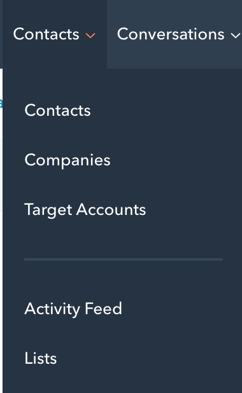
Under the Contacts tab, you will now see a menu item called Target Accounts:
Target accounts home will be the command center for your sales and marketing to monitor progress for each account and buying role. The account overview will help you keep track of high-level metrics at the top of your target accounts home and make it easy to filter through which accounts to work on next.
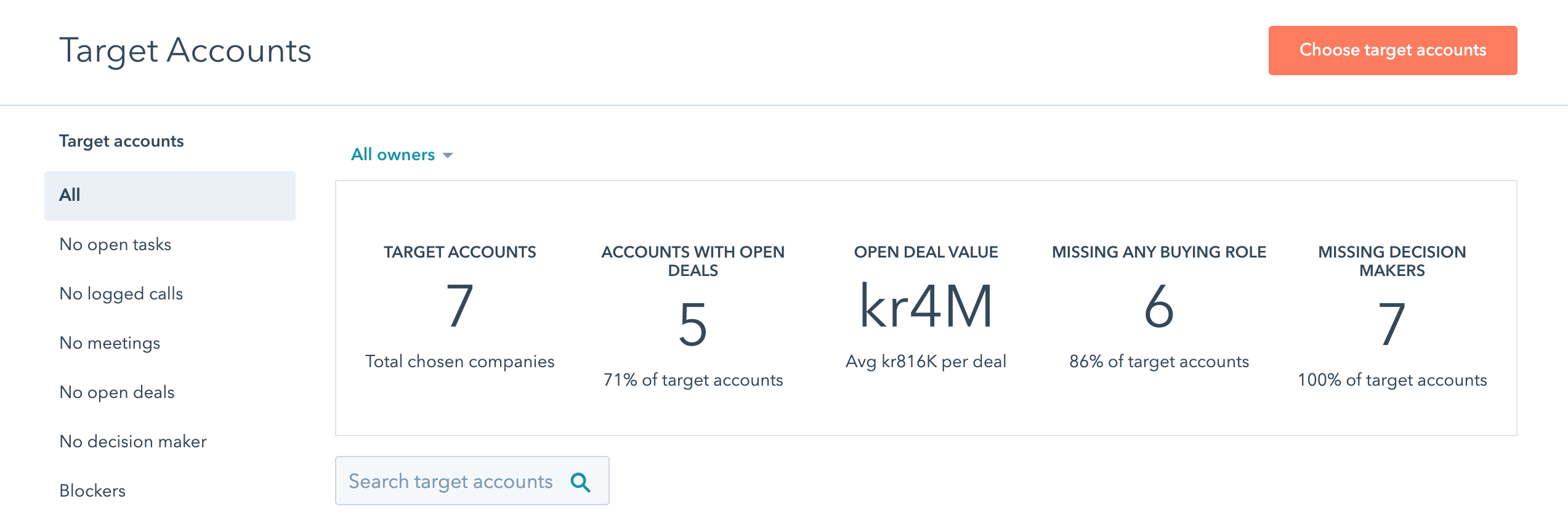
With target accounts, you can view metrics such as:
- Number of target accounts in your portal
- Which account has an open deal associated with it
- The value of each deal
- If there are buying roles missing
- Which decision-makers are missing
The target accounts home will also help you to identify potential target accounts in your portal. In the left sidebar menu, you can click Prospects to look at potential prospects. Here you will get recommendations from HubSpot based on your existing data, and you can easily add them as a target account.
Step 3: Create your account plan in HubSpot
There are three tiers of account-based marketing programs you can use to engage with your ideal buyers:
Tier 1: One-to-one ABM: Collaborative work to develop and implement a highly customized program for 10-20 individual accounts.
Tier 2: One-to-several: Working with a sales team to focus on small clusters of 20-100 accounts with a common focus such as a vertical.
Tier 3: One-to-many: Working with a sales team to define 100+ priority accounts. In this tier, you will use technology to reach your target accounts.
An account plan is a tool that helps you to build out a fit matrix based on the type of client that would be good for ABM for you:
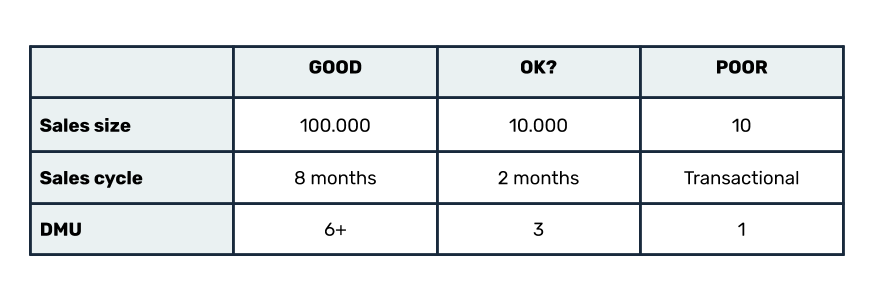
This will help you identify a list of accounts you can import into HubSpot, and set target accounts on company records when importing.
This will be the foundation for your account plan, and help you to to align your sales and marketing efforts when using HubSpot.
Using HubSpot’s ICP workflow template, you can spot common traits that can be used to classify companies in your database by how well they match your ideal customer profile.
After defining your target accounts, you need to identify who are the relevant stakeholders in the organization by assigning them different buying roles.
In HubSpot, you will now find the following buying roles:
- Blocker
- Budget Holder
- Champion
- Decision Maker
- End User
- Executive Sponsor
- Influencer
- Legal & Compliance
- Other
(You can also add custom buying roles if necessary, but you cannot delete the default ones)
Buying roles show you gaps in your sales and marketing process, identify members of the buying committee, and help you to segment the different buyer roles into active lists in HubSpot.
Segmenting contacts into buying roles gives you an account plan to attract the right stakeholders by personalizing your outreach efforts, doing targeted advertising and expanding your target accounts.
Step 4: Use the HubSpot Sales Hub to personalize your message when doing sales outreach
A buying committee is a group of different people with diverse, goals, motivations, and responsibilities. This results in a decentralized decision-making process, where a more personalized approach to outreach is required.
Up until now, HubSpot CRM has lacked some of the features sales reps need to close high-value deals at target accounts. This has resulted in many failed attempts at using HubSpot for account-based marketing.
With the new ABM tools in HubSpot, sales representatives get access to the account overview and other useful ABM tools such as:
- Company lists
- Company scoring
- Sales Navigator integration
- Email Sequences
- Documents and Snippets
- Quotes
- 1-to-1 video
- Tasks & Queues
- Meetings link
- ABM properties
- Slack integration
- Dashboards and reports
Account-based marketing is all about providing value before extracting it, and by using these tools, you can reach out to the right person at the right time with a personalized message.
Step 5: Use the Marketing Hub to attract and engage stakeholders
The standard approach most marketers use today is to generate inbound leads, nurture them with educational content, and pass the leads to a sales rep for them to qualify the lead further.
This strategy usually fails with high-value deals where decision-making is decentralized, the sales process is long, and the decision-makers are not actively looking for your solution.
On top of this, marketing departments are not aware of what sales define as a target account, which results in misalignment and marketers treating high-value accounts like any other lead.
The solution is closed-loop reporting between marketing and sales, where information about target accounts is shared in one place. With the new ABM tools in HubSpot, sales and marketing departments can work closely with each other, using the same tools, dashboards, and reports.
Here are some examples of how marketers can leverage HubSpot to attract more stakeholders at target accounts:
1) Use targeted audiences and advertising
You can now build audiences for your ABM ad campaigns using HubSpot’s out-of-the-box lists. With this feature, you can create and serve personalized ads to different stakeholders within your target accounts on popular platforms like LinkedIn and Facebook from your HubSpot account.
2) Use smart content and segmentation to personalize messaging for each stakeholder
Segmenting a target account into buying roles makes it possible to use active lists in HubSpot to trigger email and automated nurturing campaigns that keep stakeholders at your target accounts engaged.
HubSpot provides different templates for you to make it easy to get started segmenting your target audience, and helps you automatically segment contacts into different tiers and buying roles.
To take it a step further, you can also personalize the content on your website to make a page seem more relevant to a specific person or company.
This allows you to have different value propositions on the same page, send different nurturing emails to different people in each account, or give different buyers different offers on your website.
3) Make personalised landing pages
Landing pages have been in the marketer's toolbox for many years. They are traditionally used when there is a high amount of search volume for your solution each month, and you want to send traffic to an offer such as a content offer or a demo of your product.
But how can you use landing pages when the search volume is low and the number of target accounts is finite?
For account-based marketers, landing pages can be a fantastic tool when building awareness campaigns to target decision-makers at target companies.
One great example of using landing pages for account-based marketing is Procurify.
They had previously focused on inbound marketing, but few people searched for keywords relevant to their product, and Procurify had to find a way to reach relevant companies that weren’t actively looking for them.
They built 50 personalized landing pages targeting their top accounts. Each landing page was then promoted by sending out swag boxes to each person with a personalized video and a link to “their” landing page where they would get more information and a chance to book a demo. This resulted in a 38% conversion rate!
4) Page-targeting and chat
Chatbots are great tools for connecting stakeholders at your target accounts to salespeople when they arrive on your website. High-value buyers should not need to fill out forms since you have already pre-qualified them, and you want to connect with these buyers as quickly as possible.
With HubSpot’s chatbot software, you can personalize the bot messaging with company name, name, and value proposition or have a unique message for each page.
5) Use dashboards and reporting to show the success of your ABM strategy
Reporting is important to quantify and coordinate how successful your ABM efforts are. In HubSpot, you can access new dashboards and reports built specifically for executing an ABM strategy such as:
- ABM dashboards
- Target accounts dashboard library
- Target accounts report library
- Target account recommendations
- Account Overview
These reports will help you to measure the key milestones for each account, and it will make it easier for you to iterate and improve your strategy.
You salespeople will get a more detailed understanding of what is happening at each account by looking at the account overview, and they can get high-level information from each report.
You can also set up a company scoring system to automatically identify high value accounts in your database so that salespeople can get more information on which accounts to reach out to.
CONCLUSION
https://neilpatel.com/blog/account-based-marketing-inside-look-get-high-ticket-clients/