
The rules of the email marketing are stricter than most teams think.
Apple Mail prefetches every tracking pixel. Google, Yahoo, and Microsoft now reject unauthenticated bulk senders outright.
The average B2B deal involves 13 stakeholders, not one.
And HubSpot's email tool set has been rebuilt around an AI layer called Breeze.This guide walks you through what HubSpot ships for email today, what works for B2B revenue teams, and the trade-offs we make on real engagements every week.
What you need to know about HubSpot email marketing
The 6 things you have to get right:
- Email marketing returns about $36 per $1 spent in B2B software (Litmus State of Email).
- Open rate is not a reliable primary KPI. Around 49–58% of all reported opens come from Apple Mail clients with Mail Privacy Protection active.
- Authentication is the new floor. SPF + DKIM + DMARC + RFC 8058 one-click unsubscribe + spam complaint rate below 0.10% are required by Google, Yahoo, and Microsoft for any sender pushing 5,000+ emails/day to consumer inboxes.
- HubSpot's AI layer for email is Breeze. Three pillars: Breeze Assistant (chat), Breeze Agents (autonomous task agents), and Breeze Intelligence (data enrichment).
- The EU Accessibility Act effectively mandates WCAG 2.1/2.2 AA for marketing emails reaching EU recipients. About 99.89% of HTML emails currently fail accessibility audits.
- B2B buying committees average 8–13 stakeholders. Design for the committee, not the persona.
What HubSpot email marketing actually is
Definition: HubSpot email marketing is the practice of sending automated, segmented commercial emails — newsletters, nurture sequences, transactional notifications, lifecycle campaigns — using HubSpot's CRM, Marketing Hub, and Breeze AI tooling. HubSpot supports authentication (SPF/DKIM/DMARC/BIMI), per-recipient AI-generated email content, Segments, Marketing Studio campaign canvas, and Journey Orchestration across email + SMS + WhatsApp + ads.
What's worth saying out loud is that email is no longer a standalone channel.
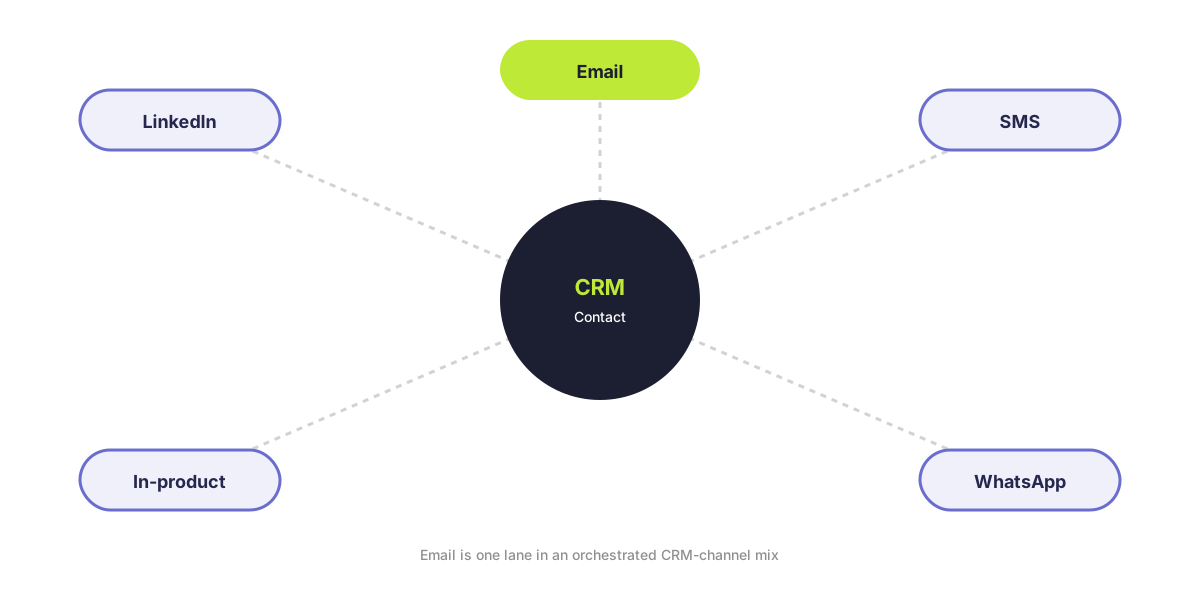
Email is one lane in an orchestrated CRM-channel mix: email plus SMS plus WhatsApp plus LinkedIn plus push plus in-product. HubSpot, Klaviyo, Braze, Iterable, and Attentive are all positioned around orchestration.
The right question is no longer "what should we email?"
It's "what's the next message on the right channel for this contact?"
Read more: What is the HubSpot Marketing Hub (2026)?
Is email marketing still relevant?
Short answer: yes.
Roughly 376 billion emails are sent daily, projected to reach 408 billion by 2027 (Radicati Group via Statista).
The number of email users sits at 4.59 billion, projected at 4.89 billion by 2028.
Bottom line: the channel is getting noisier and more regulated at the same time. The teams winning at it are running fewer broadcasts, more triggers, and tighter authentication.
Why email belongs in a B2B revenue mix
What is email marketing ROI?
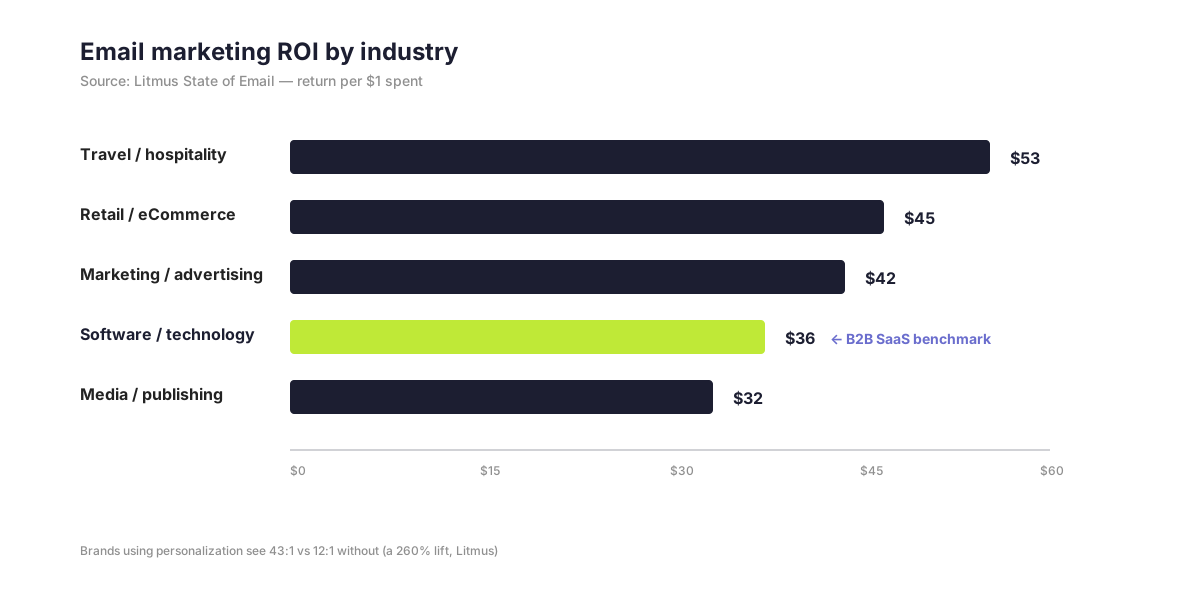
Quick answer: Email marketing returns approximately $36 for every $1 spent in B2B software (Litmus State of Email, ~500 marketers worldwide). The UK figure is £41 per £1 spent (DMA Marketer Email Tracker). The "$43 per $1" figure you'll still see quoted traces to 2019 DMA UK data and is no longer the consensus.
The interesting splits inside the average:
ROI by industry (Litmus):
- Travel/tourism/hospitality — $53:$1
- Retail/eCommerce/CPG — $45:$1
- Marketing/PR/advertising — $42:$1
- Software/technology — $36:$1
- Media/publishing/events — $32:$1
ROI by practice (also Litmus):
- Brands using personalization — 43:1 vs 12:1 without (a 260% lift)
- Brands using A/B testing — 42:1 vs 23:1 without (an 86% lift)
You don't get the headline number unless you do the unglamorous work underneath it.
How many people use email?
Email is the largest opt-in audience you can own.
- Today: 4.59 billion users
- Two years out: 4.73 billion
- Three years out: 4.85 billion (projected)
- Four years out: 4.89 billion (projected)
Source: Radicati Group / Statista.
You own the list. You don't own the algorithm.
That's the line that's mattered for fifteen years and still matters.
LinkedIn can throttle organic reach overnight. Google can change ad auction dynamics. Your email file is yours.
Why is email so effective for B2B specifically?
Quick answer: B2B sales cycles are long, multi-stakeholder, and trust-driven. Email is the only channel where you control the timing, the audience, and the message — and where automation compounds across hundreds of touchpoints.
Three numbers worth memorizing:
- 93% of B2B marketers say personalized or segmented experiences generate more leads or purchases (HubSpot State of Marketing).
- Triggered emails generate 8× more opens, 6× more clicks, and 3× higher conversions than broadcasts.
- Klaviyo Benchmark Report: automated emails are around 2% of sends but drive about 37% of revenue, with revenue-per-recipient up to 30× higher than one-off campaigns.
For a long-cycle B2B sale, that compounding matters more than a quarterly campaign.
When email is the right channel
Why does the buying committee matter for email?
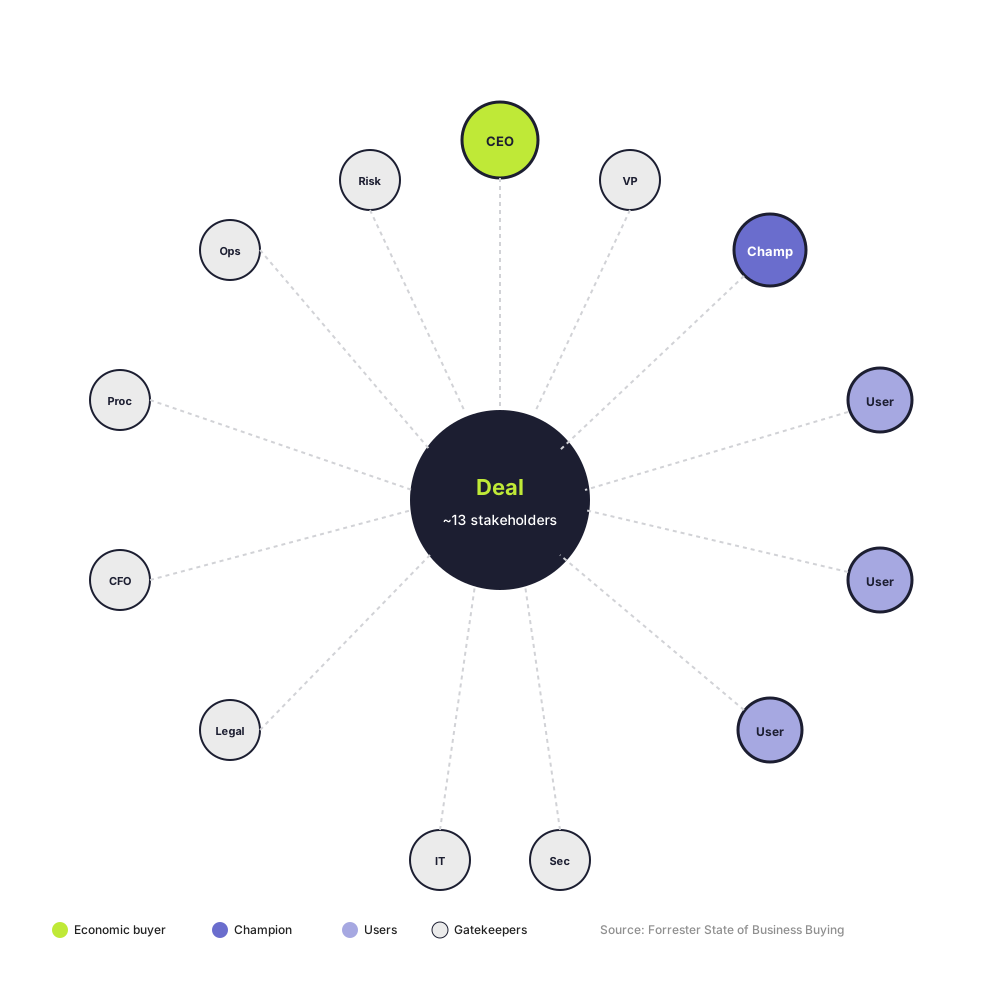
Quick answer: The average B2B purchase involves 13 stakeholders crossing multiple departments (Forrester State of Business Buying). Single-persona email sequences don't address the people who actually block deals.
Three stats every B2B marketer should know:
- 74% of B2B buying teams demonstrate "unhealthy conflict" during the decision process (Gartner). Consensus committees are 2.5× more likely to report a high-quality deal.
- 86% of B2B purchases stall (Forrester).
- 84% of deals go to the first vendor that engaged the committee in a meaningful way (6sense).
Pro tip: The case for nurture sequences that don't speak to a single persona is mathematical. You're sending material your champion can forward — internal-friendly explainers, ROI breakdowns, security overviews — that lets them sell internally on your behalf.
What are the high-return B2B email use cases?
Four use cases worth running:
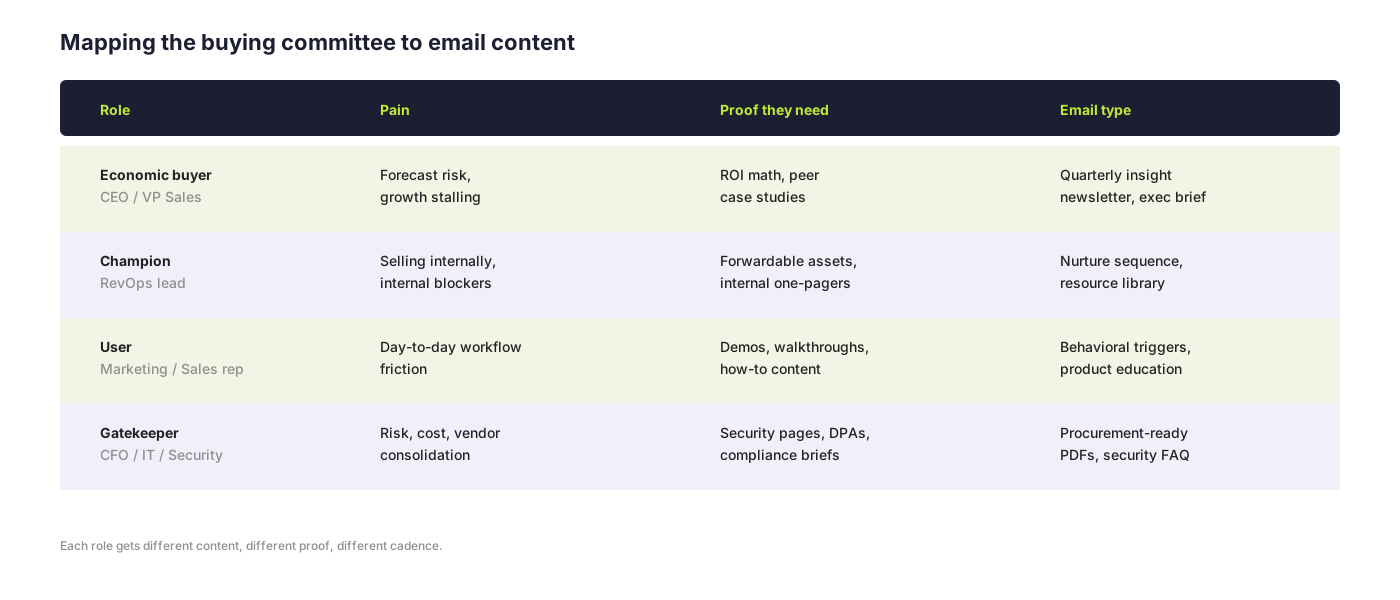
1. Multi-threading the buying committee. Different content for the economic buyer, the user, the gatekeeper, and the champion.
2. Lead generation and gated content. Email is still where most B2B teams convert content effort into pipeline. The gateable formats that earn opt-ins: assessments, calculators, benchmark reports, templates.
3. Nurture from MQL to opportunity. Drip sequences, behavioral triggers, content offers tied to pages visited.
4. Customer expansion and retention. Onboarding, product-update digests, customer newsletters, win-back flows.
For B2B, the high-value triggered flows are: trial-start, demo-no-show, pricing-page-visit, content-download, champion-job-change, renewal-window.
The foundations (ICP, goals, list building)
Step #1: Define the buying committee, not "the persona"
Move from one persona to a committee map.
For each target account, you need to know:
- Who's the economic buyer
- Who's the user
- Who's the gatekeeper (CFO, IT, security, procurement)
- Who's the champion
Each role gets different content, different proof, different cadence.
Note: HubSpot's Breeze Intelligence auto-enriches CRM contacts with firmographic and intent data from a 200M+ buyer profile database — useful for committee mapping.
Step #2: Set goals that aren't open rate
Pick metrics you can defend in a QBR:
- Click rate
- Reply rate
- Pipeline-attributed revenue
- Revenue per email
- Unsubscribe trend
Set quarterly thresholds. Review them.
Step #3: Build the list with zero-party data
Healthy email list growth runs around 2.5% per month (DMA).
Average annual list churn is around 22.5% (HubSpot).
You need consistent inflow.
What works:
- Progressive profiling (2–4 questions per touchpoint)
- Preference centers (frequency + topic + channel)
- Quizzes (Typeform, Jebbit)
- Post-event surveys
- Declared-data forms
About 38% of compliant B2B programs use zero-party data; another 52% plan adoption.
What doesn't work:
- Bought lists
- Scraped emails
- Single-confirmation opt-ins for EU contacts
- "Submit to read" walls on every blog post
What types of email campaigns work for B2B?
The five email types worth running:
- Welcome / onboarding sequences — high engagement window, high revenue per recipient.
- Behavioral triggers — pricing-page visit, demo request, content download, trial-start, champion job-change.
- Newsletters — relationship-building emails are trending up; the top 8% of programs (45:1+ ROI) lean on newsletters and onboarding.
- Lifecycle campaigns — MQL → SQL → opportunity, mapped to actions taken.
- Promotional / event-driven sends — used sparingly. Trending down across the industry.
Should you run a newsletter on HubSpot or Beehiiv?
Quick answer: Both, often. HubSpot for product comms, customer education, and lifecycle. A separate platform like Beehiiv or Substack for owned thought leadership.
Many serious B2B brands now run two newsletters.
Beehiiv ships 20+ billion emails across 75K newsletters annually.
Substack still takes 10% of paid subscription revenue forever — a real scale issue if you ever want to monetize.
Bottom line: HubSpot wins for revenue-attributed customer communication. Beehiiv wins for owned media you might one day spin into a product or community.
The HubSpot email marketing stack
What does HubSpot ship for email marketing?
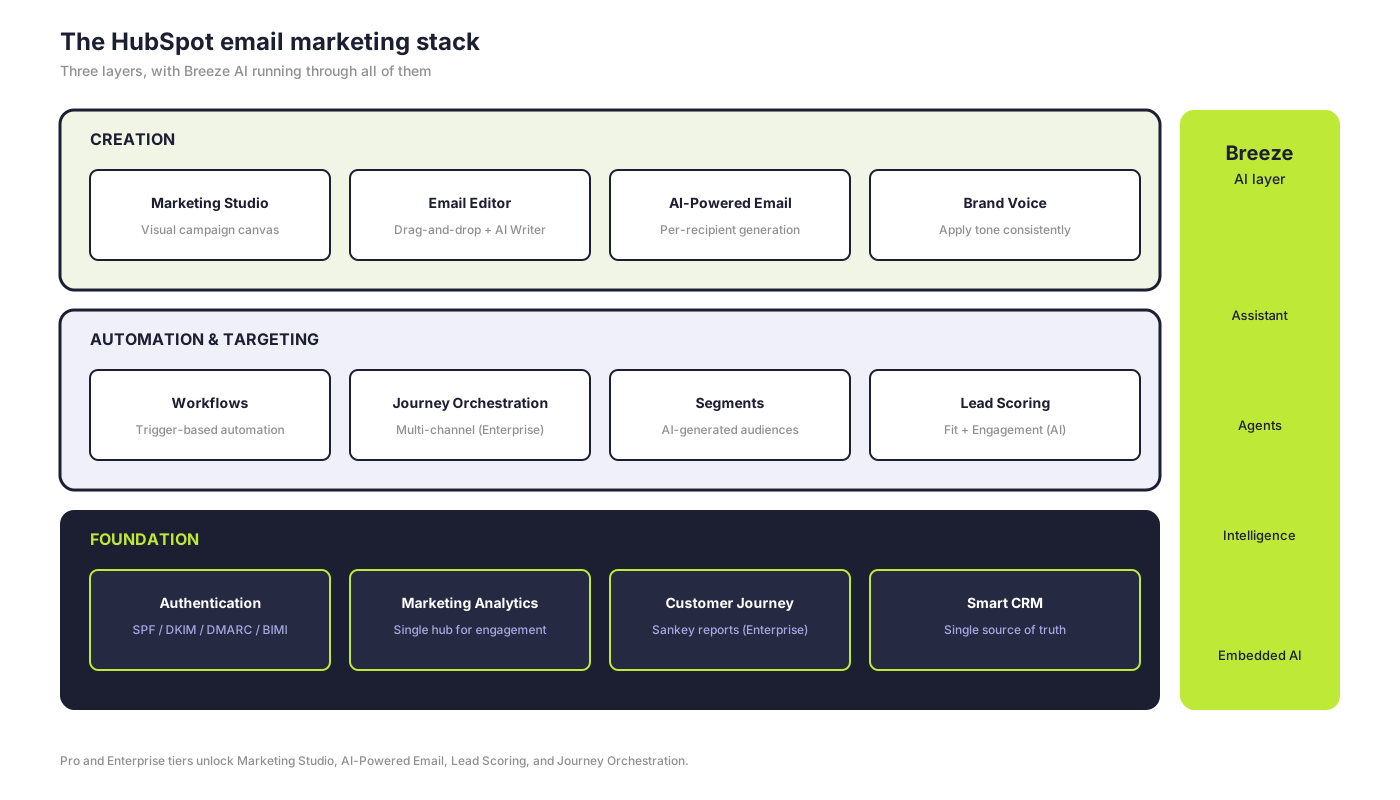
The HubSpot email tool set is built around an AI core (Breeze), a visual campaign canvas (Marketing Studio), classic workflows, and a reporting suite that ties email to revenue.
The pieces that matter most:
Marketing Studio. A visual campaign canvas where AI auto-fills campaign name, audience, budget, and generates email drafts, landing pages, and forms from a brief.
AI-Powered Email. Per-recipient AI-generated email content plus Email Engagement Optimization that predicts who will engage and when. Marketing Hub Pro and Enterprise. Consumes HubSpot Credits.
Drag-and-drop email editor with embedded AI Email Writer. Slash- and highlight-commands for Rewrite, Expand, Shorten, Change Tone, Apply Brand Voice. Available across tiers.
Email Health / Messaging Insights (beta). AI analyzes deliverability, engagement, content, CTAs, and recipients.
Authentication UI. SPF / DKIM / DMARC management with record warnings; up to 2,000 sending domains; BIMI supported.
Workflows. Trigger-based automation, with AI workflow generation via Breeze Assistant. New trigger types include buying signals, AI-scoring thresholds, deal and ticket properties.
Journey Orchestration (Enterprise). Lifecycle-spanning orchestration that integrates email, SMS, push, and ads with built-in journey analytics and revenue attribution.
Marketing Analytics Suite. Single hub for email engagement, ads, forms, SMS, CTAs, customer journey, web traffic.
Customer Journey Reports (Enterprise). Sankey-style visualization of email events.
Lead Scoring. Fit + Engagement scores; "Create score with AI" workflow. Marketing Hub Pro and Enterprise.
How much does HubSpot Marketing Hub cost?
Quick answer: Marketing Hub Free is $0. Starter is $20/seat/month. Professional is $890/month base plus a mandatory $3,000 onboarding fee. Enterprise is $3,600/month base. AI features consume HubSpot Credits — Pro gets 5,000/month, Enterprise gets 10,000/month.
The pricing tiers:
- Free — $0
- Starter — $20/seat/month (1,000 contacts)
- Professional — $890/month base + mandatory $3,000 onboarding (3 seats, 2,000 contacts)
- Enterprise — $3,600/month base (5 seats, 10,000 contacts)
Note: Verify on hubspot.com/pricing/marketing before purchase. Pricing shifts.
That's the surface.
The interesting layer underneath is Breeze.
AI in HubSpot email marketing — Breeze
What is HubSpot Breeze?
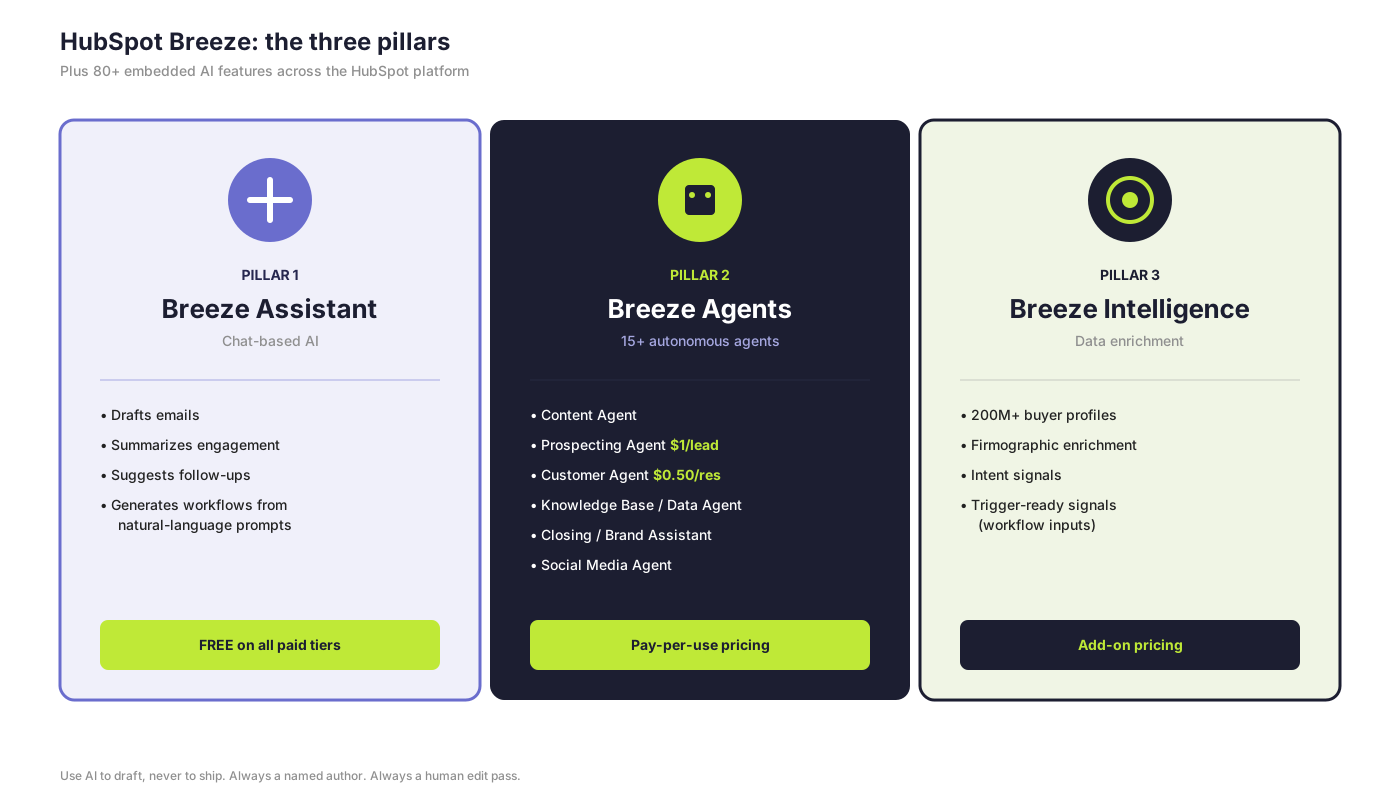
Definition: Breeze is HubSpot's AI brand. It has three pillars — Breeze Assistant (chat), Breeze Agents (autonomous task agents), and Breeze Intelligence (data enrichment) — plus 80+ embedded AI features across the HubSpot platform.
Here's what actually matters for email.
Pillar 1: Breeze Assistant
Chat-based AI across the HubSpot web app, mobile, and browser extensions.
What it does for email:
- Drafts emails
- Summarizes engagement
- Suggests follow-ups
- Generates workflow recipes from natural-language prompts
Free across all paid tiers.
Read more: What is the HubSpot Marketing Hub (2026)?
Pillar 2: Breeze Agents
The agents that ship work without a human in the loop. The ones with email impact:
- Content Agent — generates email copy, blogs, landing pages in your brand voice.
- Prospecting Agent — drafts personalized outbound 24/7. Pricing: $1 per recommended lead.
- Customer Agent — handles chat, voice, WhatsApp, and email support. $0.50 per resolution. Resolves around 65% of tickets on average.
- Knowledge Base Agent, Data Agent, Closing Agent, Brand Assistant, Social Media Agent.
- Breeze Studio — no-code agent customization.
- Breeze Marketplace — agent discovery and install.
Pillar 3: Breeze Intelligence
Data enrichment over a 200M+ profile database.
Adds firmographic and intent signals to your CRM.
Those signals can fire workflow triggers — pricing-page visit by a target account, hiring signal at an ICP fit, technographic match — which is where Breeze Intelligence earns its keep on the email side.
Which HubSpot AI email features are free?
Three free AI email tools you can use today:
- AI Email Writer in the email editor
- AI subject line generator embedded in the editor
- Campaign Assistant — public-beta tool that generates landing-page copy, an email, and ad copy from a brief at hubspot.com/campaign-assistant
Which AI email features are paid?
Pro / Enterprise email AI features:
- AI-Powered Email — per-recipient generation (Pro/Enterprise)
- Send Time Optimization — "Suggest best time" at account level (Pro/Enterprise); Contact Send Time Optimization with per-contact ML across a 168-hour window (Enterprise)
- AI Lead Scoring — Fit + Engagement scores; "Create score with AI" workflow (Pro/Enterprise)
- Lookalike Segments (Marketing Hub Enterprise)
- Smart Insights — proactive AI analysis of CRM and campaign trends
How many marketers use AI for email?
Quick answer: 80%+ of marketers use AI for email content (HubSpot State of Marketing). Only 6% of teams need 2+ weeks to produce an email — down from 62% recently (Litmus State of Email).
The rest of the numbers behind the AI shift:
- 49% of email marketers use generative AI for static copy creation; 340% YoY growth in AI-generated images (Validity / Litmus).
- HubSpot's own demand-gen team using GPT-4 for nurturing reported 82% higher conversion, 30% higher opens, 50% higher CTR.
- 95% of marketers using gen-AI for email rate it "effective"; 54% rate it "very effective" (HubSpot State of Generative AI).
Pro tip: Use AI to draft, never to ship.
AI floods every inbox with content that reads exactly the same. Growth comes from distinctiveness, real human stories, and content that feels authentic.
Always a named author. Always a human edit pass.
What are Segments in HubSpot?
Quick answer: Segments are HubSpot's tool for grouping contacts, companies, deals, tickets, orders, and custom objects into reusable audiences. (Older docs and team SOPs may still call them "Lists" — same concept, current name is Segments.) Segments can be defined by static membership or by dynamic filters that update as records change.
What HubSpot's segmentation tooling ships today:
- AI-generated segment filters from a natural-language description. ("Contacts at SaaS companies in the Nordics with 100–500 employees who visited the pricing page in the last 30 days.")
- AI-suggested new segments based on your goals.
- Lookalike Segments that find contacts mirroring your highest-engagement audience. Marketing Hub Enterprise only.
- Cross-object scope — segments span Contacts, Companies, Deals, Tickets, Orders, and Custom Objects.
- Breeze Intelligence enrichment for richer firmographic and intent segmentation.
Does email segmentation actually work?
The numbers:
- Segmented emails drive 30% more opens and 50% more click-throughs (HubSpot State of Marketing).
- 78% of marketers say segmentation is their most effective tactic.
- Segmented B2B campaigns record 74% higher click rates than non-segmented (SQ Magazine).
- 67% of B2B marketers use behavioral segmentation; ICP-tier sequences convert 2.3× better.
What's the right B2B segmentation framework?
A five-layer framework:
- Lifecycle / stage — subscriber, MQL, SQL, customer, advocate.
- Firmographic — industry, size, role, geography.
- Behavioral — pages visited, content downloaded, last clicked.
- Predictive — lead score, churn risk, next-best content.
- Declared / zero-party — preference center inputs.
Stack the five.
Don't pick one.
What subject line length performs best in B2B?
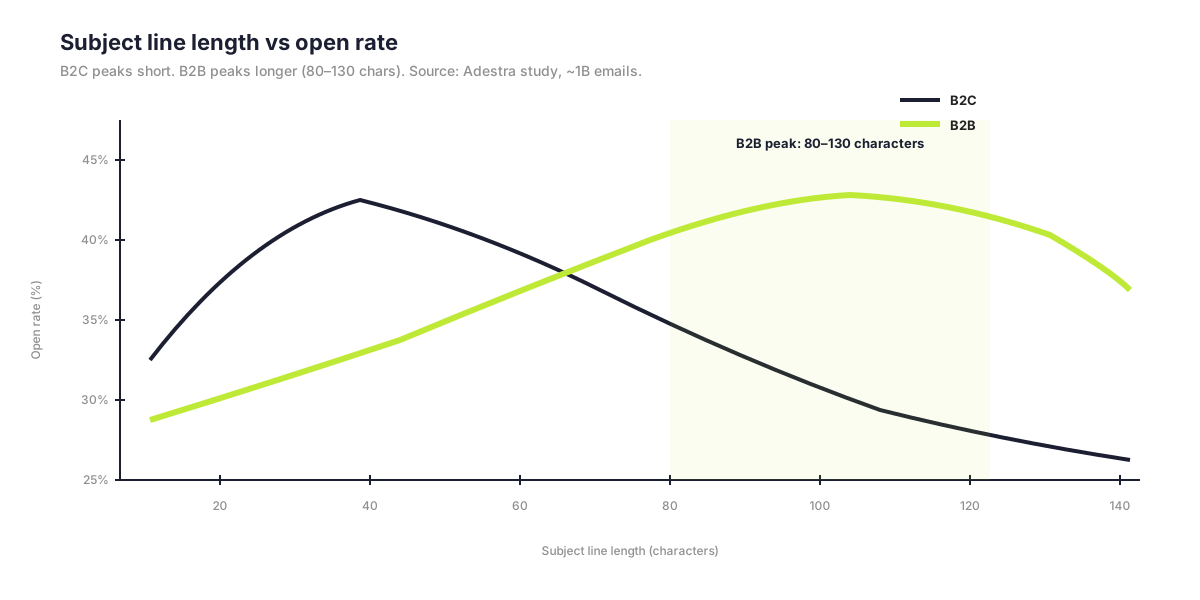
The general consensus is around 9 words / 60 characters or fewer (Mailchimp).
The B2B contrarian finding worth knowing: an Adestra study of nearly 1 billion emails found longer subject lines — 6–10 words, 80–130 characters — drove better B2B opens.
MailOptin's aggregator put the highest open rate in the 61–70 character range at 43.38%.
Translation: don't blindly trim. Test it.
Does subject line personalization still work?
Quick answer: Yes. Personalized subject lines drive a 22–26% open lift (Campaign Monitor); Mailchimp measured 18.3%. Yet only 9.67% of emails actually use subject-line personalization (GetResponse, 4.4 billion email sample). It's the cheapest available win.
Three more subject-line research notes:
- Emoji impact is mixed (GetResponse 37.50% with vs 39.74% without; Litmus reports up to 28% CTR lift when used well). Test by audience.
- Preheader text adds about 13.72% open lift — campaigns using preheaders run 44.67% open vs 39.28% without (GetResponse).
- Always write the preheader.
How long should B2B emails be?
The format-to-purpose rules:
| Email type | Recommended length |
|---|---|
| Sales follow-up | Under 150 words, plain text, single CTA |
| Nurture | 200–400 words |
| Newsletter or thought leadership | Up to 1,500+ words for engaged audiences |
Other copy rules:
- Conversational, named-author, founder-voice in B2B nurture
- 80% text / 20% image ratio
- Left-align body copy longer than two lines
- One primary CTA per email — never three
Are mobile-first emails still the rule?
The "55% open on mobile" framing is misleading post-MPP.
Open metrics aren't fully reliable.
The current framing: Apple Mail commands around 58% of email opens (Litmus), much of that on iPhone Mail. Clean Email's measurements put mobile share between 41–78% depending on methodology.
Note: Apple Mail's iOS update added Categories tabs (Primary, Transactions, Updates, Promotions) and AI Summaries that replace your preheader on Apple Intelligence-capable devices. Email clipping has gotten more aggressive.
Keep emails shorter and more text-focused.
Do AI-generated emails need disclosure under EU law?
Quick answer: Probably not for standard commercial marketing AI. EU AI Act Article 50 takes full effect on 2 August 2026. AI-generated text "published to inform the public" may require disclosure unless reviewed by a human with editorial responsibility. Most marketing AI (copy, subject lines, basic personalization) falls into minimal/limited risk and is exempt — but document your AI usage and have an editorial review step on the record.
Pro tip: If you're running AI-generated copy at scale, add a one-line policy doc to your team wiki: AI is used to draft email copy; all sends are reviewed by [name] before publication. That's enough for most regulato
What A/B testing tools does HubSpot offer?
Three testing capabilities in HubSpot today:
- A/B testing for marketing emails — Marketing Hub Pro and Enterprise. Recommended ≥1,000 contacts per arm.
- A/B testing for automated emails via workflows.
- Sales sequences — up to 6 variants, 4 active simultaneously.
Does HubSpot support multivariate email testing?
Quick answer: No. HubSpot has not shipped native multivariate (3+ variant) testing for marketing emails. Adaptive Testing exists in Content Hub but applies to landing and website pages, not email content. ESPs like Iterable offer native multivariate.
If 3+ variant testing is core to your program, factor it in before you commit to HubSpot for high-volume email.
Does A/B testing actually move email ROI?
The data on testing discipline:
- Brands that A/B test see 42:1 ROI versus 23:1 for those who don't (Litmus) — an 86% lift.
That's the math.
Best practices:
- Test one variable at a time
- ≥1,000 recipients per arm for statistical significance
- Subject line first (around 80% of tests)
- Then send time, sender name, CTA, body copy
What's the difference between Workflows, Journey Orchestration, and Marketing Studio?
Three automation paths exist in HubSpot. Pick deliberately.
1. Workflows — the classic.
Trigger-based automation with AI workflow generation via Breeze Assistant — describe the workflow in natural language, get a draft. Trigger types include buying signals from Breeze Intelligence, AI-scoring thresholds, deal and ticket properties.
2. Journey Orchestration (Marketing Hub Enterprise).
Lifecycle-spanning orchestration that integrates email, SMS, push, and ads with built-in journey analytics and revenue attribution.
This is the layer above workflows — for when "the email part" is one channel inside a larger flow.
3. Marketing Studio.
Visual campaign canvas with embedded automation. AI generates assets from a brief. Best for cross-functional campaigns where you want the whole campaign visible on one canvas.
When should you use each one?
| Path | Best for | Tier |
|---|---|---|
| Workflows | Single-channel automations, lifecycle triggers | Pro and Enterprise |
| Journey Orchestration | Multi-channel customer journeys with revenue attribution | Enterprise |
| Marketing Studio | Cross-functional campaign planning + execution | Pro and Enterprise |
What's the best time to send B2B emails?
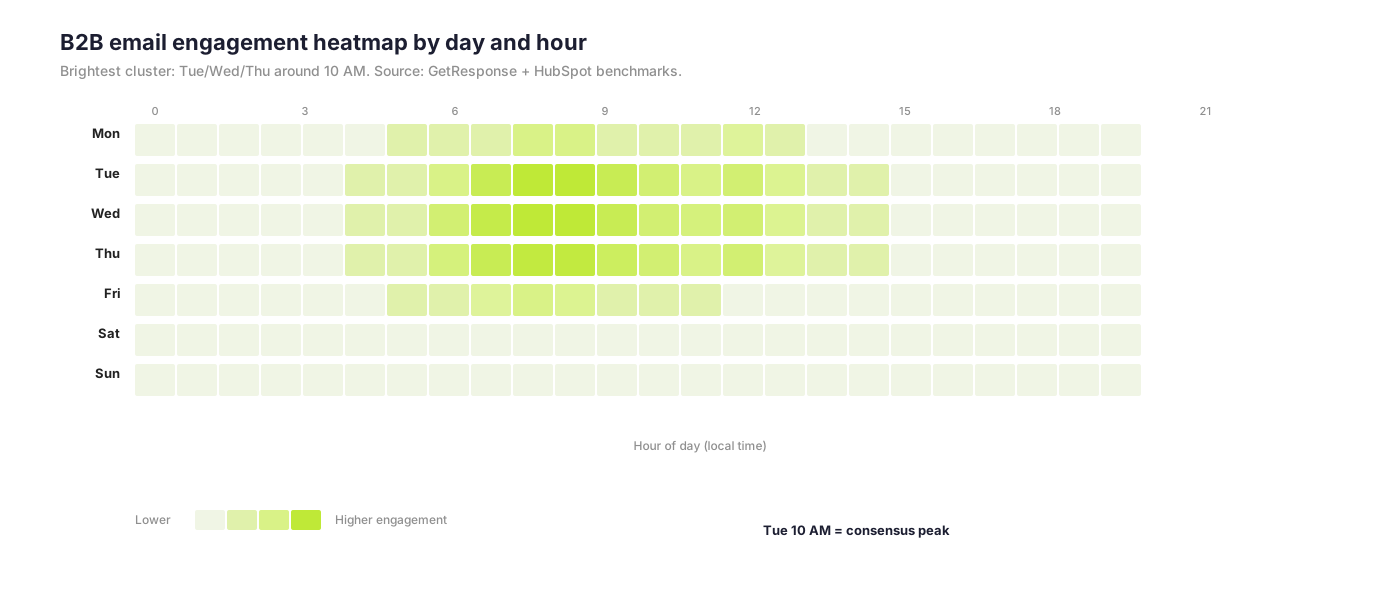
Quick answer: Tuesday at 10 AM local time is the consensus peak. About 47.9% of B2B marketers report most engagement between 9 AM and noon. Wednesday and Thursday are close behind. The first hour after send captures 21.20% of opens and 44.14% of clicks (GetResponse).
The send-time tiers in HubSpot:
- "Suggest best time to send" (account-wide ML). Pro and Enterprise.
- Contact Send Time Optimization (per-contact ML, 168-hour window). Enterprise only.
- Throttling marketing emails (slower, paced sends). Pro and Enterprise, beta.
AI send-time optimization typically lifts open rates 8–15% in practice (median ~10–12%); some vendors claim up to 47%.
Treat the high end as marketing.
How often should B2B companies send emails?
Quick answer: For B2B opt-in lists, 1–2 emails per week is the sweet spot. Twice-per-week sends generate the highest click rates (5.31%, MailerLite). Subscribers tolerate around 5 emails/week before disengagement; 44% of unsubscribes cite high frequency.
About 89% of businesses send at least one email per month; 52% send weekly.
Why are triggered emails so much better than broadcasts?
The asymmetry is dramatic:
- Triggered emails generate 8× more opens, 6× more clicks, and 3× higher conversion than broadcasts.
- Klaviyo: automated emails are about 2% of sends but drive about 37% of revenue, with up to 30× more revenue per recipient.
Bottom line: if your program is 95% broadcast, your program is leaving most of the revenue on the table.
Can HubSpot do SMS for global B2B?
Critical limitation for global B2B: HubSpot Marketing SMS sends only from US-based numbers, sending only to US/Canada (+1 country codes). Sole proprietors are not supported.
Roughly $75/month for 1,000 message segments, powered by Twilio.
For UK / EU / Nordics, WhatsApp Business is the better fit and is native in Marketing Hub or Service Hub Pro/Enterprise.
For international SMS, third-party tools (Sakari, Salesmsg, Sinch) integrate with HubSpot.
Measuring what actually matters
In this chapter: why open rate is a poor primary KPI, the replacement metric stack for B2B, the current benchmarks, and the HubSpot reporting tools that actually pay back.
Is open rate still a useful email marketing metric?
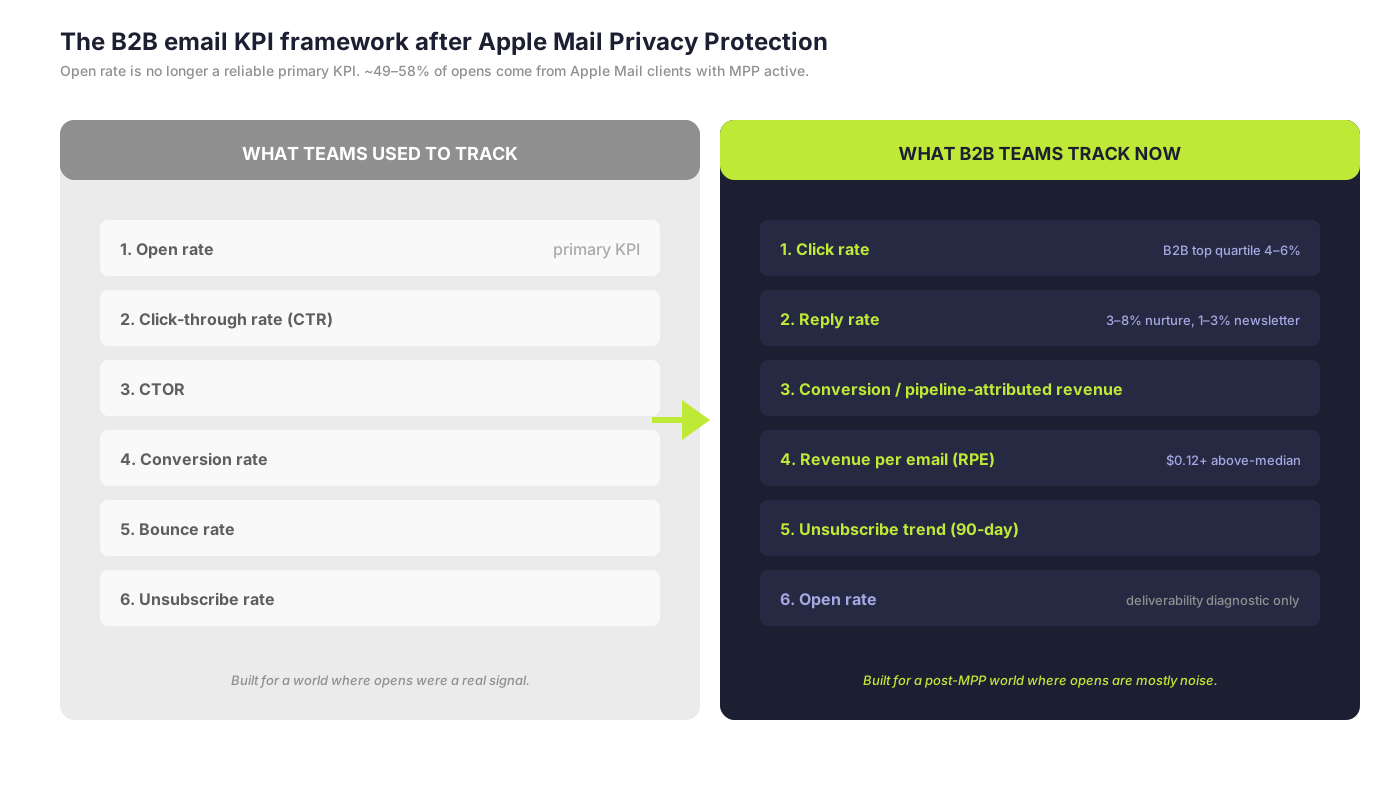
Quick answer: Not as a primary KPI. Apple Mail Privacy Protection accounts for around 49–58% of all reported opens. Open rates are inflated 15–35%. Use clicks, replies, conversions, and revenue per email instead. Keep open rate only as a deliverability and list-hygiene diagnostic.
What's happening underneath:
- MPP pre-fetches images, including the open-tracking pixel, regardless of whether the user opens the email.
- Brevo stopped excluding MPP opens by default.
- Mailchimp added optional MPP exclusion.
- MPP is on by default in iOS — it affects users who aren't actively using Mail.
About 15% of marketers still use open rate as their primary KPI (Litmus).
Litmus calls this a mistake explicitly.
Pro tip: Stop using opens as automation triggers. Replace "has not opened in 90 days" suppression with "has not clicked in 90 days."
What email metrics should B2B teams track?
The metric stack:
- Click rate — B2B top quartile 4–6%
- CTOR on non-Apple segments — B2B top quartile 12–18%
- Reply rate — 1–3% for newsletters; 3–8% for nurture
- Conversion / pipeline-attributed revenue
- Revenue per email (RPE) — Klaviyo benchmark $0.12+ for above-median brands
- Unsubscribe trend — rolling 90-day; under 0.2% per campaign
- Open rate — kept only as a deliverability and list-hygiene diagnostic
What are the B2B email benchmarks?
| Metric | B2B Services | SaaS | All-Industry Avg |
|---|---|---|---|
| Open rate (MPP-inflated) | 39.48% (Klaviyo) | 36–37% | 42.35% (MailerLite) |
| CTR | 2.21% (Brevo) | 1.19% (ActiveCampaign) | 2.3–2.5% |
| CTOR | 5.63% (SalesHive) | 6.81% (MailerLite) | 5.3% |
| Bounce rate | <0.5% target | <0.5% | 2.48% (WebFX) |
| Unsubscribe rate | 0.3% | 0.14% | 0.22% (Mailchimp) |
| Spam complaint rate | <0.1% target | <0.1% | 0.03% global avg |
Sources: Klaviyo benchmarks; Brevo benchmarks; SalesHive B2B SaaS report; HubSpot benchmarks blog.
Which HubSpot reports actually pay back?
Five reporting tools that matter most:
- Marketing Analytics Suite — single hub for email engagement, ads, forms, SMS, CTAs, customer journey, web traffic.
- Customer Journey Reports (Enterprise) — Sankey-style visualization of email events.
- Custom Report Builder with AI-tagged email metadata.
- Smart Insights — proactive AI pattern detection across your CRM.
- Revenue attribution reports (Enterprise).
Pro tip: If you only use one, build a Customer Journey Report on your highest-volume nurture and look at where contacts actually drop out. That single report retires more useless KPI dashboards than anything else we deploy.
What are the Google and Yahoo email sender requirements?
Quick answer: Senders pushing 5,000+ emails/day to personal Gmail or Yahoo accounts must authenticate with SPF + DKIM + DMARC, implement RFC 8058 one-click unsubscribe, and hold spam complaints below 0.30% (target below 0.10%). Non-compliant mail is rejected outright.
The full Google + Yahoo requirements:
- SPF + DKIM + DMARC (p=none minimum) with alignment
- RFC 8058 one-click unsubscribe
- Spam complaint rate below 0.30% (target below 0.10%)
- TLS, valid PTR / reverse DNS, no Gmail From: impersonation
- ARC headers for forwarded mail; List-ID for mailing lists
Sources: Google Postmaster (support.google.com/mail/answer/81126); Yahoo Sender Hub (senders.yahooinc.com).
What are Microsoft's sender requirements?
Quick answer: Microsoft hard-rejects non-compliant bulk senders with 5.7.515 SMTP errors. Senders pushing 5,000+/day to consumer Microsoft domains (outlook.com, hotmail.com, live.com, msn.com) must meet the SPF + DKIM + DMARC bar. Microsoft 365 enterprise tenants are not yet in scope.
Other Microsoft requirements:
- Valid functional From / Reply-To
- Clean lists
- RFC 8058 strongly recommended but not yet mandated
- Use SNDS (Smart Network Data Services) and JMRP (Junk Mail Reporting Program) for monitoring
What's the state of DMARC adoption?
The numbers across the top 1.8M domains:
- 47.7–52% have a valid DMARC record (EasyDMARC / Red Sift)
- Only around 11% globally are at p=reject with 100% enforcement
- Fortune 500 adoption is 95%, with 62–80% at enforcement
- Inc. 5000 only 15% at p=reject
Two regulatory pressures worth knowing:
- PCI DSS v4.0 requires p=quarantine or p=reject for organizations handling card payments.
- BIMI requires p=quarantine minimum; we recommend p=reject for any program serious about deliverability.
Does HubSpot support BIMI? And do you need a trademark?
Quick answer: Yes, HubSpot supports BIMI. And no — you no longer need a registered trademark. Common Mark Certificates (CMCs) accepted by Gmail ($650–$1,099/year, no trademark required) democratized BIMI for non-trademarked brands.
The full BIMI picture:
- Adoption — around 4.57% of surveyed domains (Validity); up 53% YoY
- CMC — $650–$1,099/year, accepted by Gmail, no trademark needed
- VMC — $749–$1,688/year, required for Gmail blue checkmark + Apple Mail
- Apple stopped accepting Entrust certificates issued after 15 November 2024 — DigiCert is safe
- Yahoo / Fastmail — self-asserted BIMI free, no certificate
- Microsoft — preview only; no GA yet
- ROI — around 10% open lift (Verizon study); up to 21% in some cases
About 84% of BIMI failures trace to DMARC stuck at p=none.
Pro tip: Apple Business Connect / Branded Mail is free and complementary to BIMI. Up to 90% logo coverage for participating brands. Set this up alongside BIMI.
How do you set up authentication in HubSpot?
Manage SPF / DKIM / DMARC inside HubSpot under Settings → Marketing Email.
- Up to 2,000 sending domains
- Record warnings flag misconfigurations
- The HubSpot infrastructure runs DMARC at quarantine policy
What is the GDPR position on B2B email?
The headline rules:
- EDPB Guidelines 1/2024 on legitimate interest — three-part test: legitimate interest pursued, processing necessary, balancing test against data subject rights.
- CJEU Case C-621/22 KNLTB: purely commercial interests can qualify as legitimate interests — useful for direct marketing.
- CNIL fined Google €325M and Shein €150M; the Google fine specifically addressed Gmail-tab ads as direct marketing requiring consent.
Pro tip: Document a Legitimate Interest Assessment (LIA) for all B2B legitimate-interest sends.
B2B specifics worth knowing:
- Germany UWG §7 requires consent even for B2B electronic marketing.
- UK and Ireland are more permissive (corporate subscribers exempt under PECR).
What does the EU AI Act mean for email marketing?
In force 1 August 2024; full applicability 2 August 2026.
Article 50 transparency:
- AI-generated content disclosure for chatbots and AI text "published to inform the public"
- Deepfakes must be marked
Risk classification:
- Most marketing AI (copy, subject lines, basic personalization) — minimal risk
- Lead-scoring and profiling AI — may be high-risk
Penalties up to 7% of global turnover for prohibited AI; 3% for high-risk non-compliance.
Where does ePrivacy stand?
The ePrivacy Regulation was withdrawn. The Directive remains, fragmented by member state.
Other updates:
- EDPB Guidelines 2/2023 brought tracking pixels, URL tracking, and fingerprinting under Article 5(3).
- CNIL draft recommendation: email tracking pixels may require separate, distinct consent in France — fundamentally affects open tracking if finalized.
What's happening with US state privacy laws?
Quick answer: 20 US states have comprehensive privacy laws. Universal Opt-Out / Global Privacy Control is mandatory in 12 of them.
Active comprehensive laws span CA, VA, CO, CT, UT, TX, OR, MT, FL, DE, IA, NH, NJ, TN, MN, MD, NE, IN, KY, RI.
Cure periods are sunsetting in CT, DE, KY, MN, MT — instant enforcement.
Universal Opt-Out / Global Privacy Control mandatory in 12 states: CA, CO, CT, TX, MT, NH, NE, OR, DE, NJ, MN, MD.
Three coming changes worth knowing:
- California ADMT rules (effective 1 January 2027): opt-out plus pre-use notice for AI replacing or substantially replacing human decisions.
- California Delete Act / DROP system for data brokers — starts August 2026.
- Connecticut adds neural data to sensitive category — July 2026.
Recent enforcement: Tractor Supply $1.35M CCPA fine; 7-figure GPC settlements in CA / CO / CT.
What's the latest with CAN-SPAM and CASL?
CAN-SPAM (US): Inflation-adjusted penalty around $53,088 per violation. The FTC v. Verkada case set a record $2.95M CAN-SPAM penalty bundled with security charges.
CASL (Canada): Express vs implied consent; conspicuous publication exception for B2B; max CAD $1M (individual) / $10M (organization). Private right of action remains suspended.
What other jurisdictions matter for B2B email?
- UK Data (Use and Access) Act 2025 — amends UK GDPR and PECR; introduces a charitable purpose soft opt-in.
- India DPDP Rules 2025. Substantive obligations effective 13 May 2027. Affirmative consent; one-click withdrawal; ₹250 crore (~$30M) penalty per breach. Extra-territorial.
- Brazil LGPD — ANPD active enforcement; amendment proposes 4% revenue / R$100M fine cap.
- Australia Spam Act — 5-working-day unsubscribe processing; functional for ≥30 days.
- Germany UWG §7 — consent required even for B2B electronic marketing.
What's the B2B email compliance checklist?
The full checklist:
- SPF + DKIM (≥1024-bit) + DMARC (p=none → quarantine within 6 months → reject within 12 months) with alignment
- RFC 8058 one-click unsubscribe + visible HTML unsubscribe
- Spam complaint rate target below 0.10%; hard cap below 0.30%
- Enrolled in Google Postmaster, Yahoo Sender Hub, Microsoft SNDS + JMRP
- BIMI implemented (CMC for fast wins, VMC for Gmail blue checkmark)
- Subdomain segmentation (marketing / transactional)
- Documented lawful basis per segment (consent vs legitimate interest); LIAs documented
- Double opt-in for EU / Brazil / India / sensitive segments
- Privacy notice meeting GDPR Art 13/14, CCPA, India DPDP standards
- Universal opt-out / GPC honored on websites (12+ US states)
- Replaced opens-based automation triggers with click-based
- Sender + physical postal address in every email
- AI usage documented; AI-generated content disclosed where applicable
- Accessibility audit completed (EAA, WCAG 2.1/2.2 AA)
- Vendor DPAs in place; DPF certification or SCCs verified
What is the EU Accessibility Act for email?
Quick answer: The European Accessibility Act took effect on 28 June 2025. WCAG 2.1/2.2 AA is now effectively mandatory for marketing emails reaching EU recipients. Penalties: Germany up to €500K; France, Sweden, Ireland €200–250K; Italy 5% of annual turnover.
The Email Markup Consortium analyzed 443,585 emails and found 99.89% contain "Serious" or "Critical" accessibility issues.
Almost no one is currently compliant.
What does an accessible email look like?
The design checklist:
- Real text, not images of text
- Descriptive alt text on every image
- Logical heading hierarchy
- 4.5:1 contrast minimum
- Semantic HTML with
role="presentation"on layout tables - Descriptive link text (never "click here")
- Email works without images on
- Designed for dark mode (35%+ of opens are dark mode; use
meta color-schemeandprefers-color-schememedia queries)
Bottom line: Accessibility is the cheapest deliverable you can ship this quarter. Most teams are 5–10 fixes from compliance.
Who shouldn't run HubSpot email marketing?
Four scenarios where HubSpot email isn't the right fit:
2. You're a pure consumer brand. Klaviyo and Attentive will give you better SMS/email orchestration, deeper Shopify integration, and better automation flow templates than HubSpot for eCommerce.
3. Your buyers don't read email. If your ICP is in WhatsApp (LATAM, India, MENA), LINE (Japan), or WeChat (China), email is the wrong primary channel. Use HubSpot's WhatsApp integration as the spine and treat email as a secondary touchpoint.
4. You can't commit to the deliverability hygiene. If your team won't run authentication, monitor spam rates, segment cleanly, and replace open-based suppression with click-based — none of the rest of this matters. Mailbox providers will quietly route you to spam. You won't know until your numbers cliff.
What's the 30-day HubSpot email modernization plan?
If you read this and felt slightly behind, here's the practical list:
- Audit authentication. Confirm SPF, DKIM, DMARC are aligned and DMARC is at least p=quarantine. Enroll in Google Postmaster, Yahoo Sender Hub, Microsoft SNDS + JMRP.
- Tidy your Segments. Rebuild your top 10 segments to span Companies + Deals where appropriate; retire unused or stale ones.
- Rip out open-based automation triggers. Replace "has not opened in 90 days" with "has not clicked in 90 days" everywhere.
- Set up one Breeze workflow. Pick a single nurture sequence; use Breeze Assistant to draft it; have a human edit; ship it.
- Run an accessibility audit. Use Email Markup Consortium's checker or Litmus. Fix the top 3 issues across your highest-volume templates before the next EU send.
- Rebuild your KPI dashboard. Click rate, CTOR, reply rate, conversion, RPE, unsubscribe trend. Demote open rate to a deliverability diagnostic.
- Document AI usage. Lightweight policy doc; named editorial reviewer; ready for EU AI Act Article 50.
That's a quarter of work.
Most of it is hygiene, not strategy.
That's the point.
The bottom line
HubSpot email marketing, done well, looks like this: a tight authentication stack underneath; a segmentation layer that combines firmographic, behavioral, and zero-party data; an AI layer (Breeze) that drafts, suggests, and personalizes; a workflow library tuned to triggered events instead of broadcast blasts; a measurement framework that ignores Apple-prefetched opens and tracks clicks, replies, conversions, and revenue per email; and an accessibility and compliance layer that won't surprise you with a regulatory bill.
The teams winning at this run fewer broadcasts, more triggers, more segmentation, and tighter authentication.
The teams losing are still tracking opens, blasting weekly newsletters to the entire database, and personalizing the first name.
Your job is to be in the first group.
Frequently asked questions
What is HubSpot email marketing?
HubSpot email marketing is the practice of sending automated, segmented commercial emails using HubSpot's CRM, Marketing Hub, and Breeze AI tooling. It supports authentication (SPF/DKIM/DMARC/BIMI), AI-powered per-recipient generation, Segments, Marketing Studio campaign canvas, and Journey Orchestration across email + SMS + WhatsApp + ads.
How much does HubSpot Marketing Hub cost?
Marketing Hub Free is $0. Starter is $20/seat/month. Professional is $890/month base plus a mandatory $3,000 onboarding fee. Enterprise is $3,600/month base. AI features consume HubSpot Credits — Pro gets 5,000/month, Enterprise gets 10,000/month. Verify on hubspot.com/pricing/marketing before purchase.
What are Segments in HubSpot?
Segments are HubSpot's tool for grouping contacts, companies, deals, tickets, orders, and custom objects into reusable audiences. (Older docs may still call them "Lists.") AI-generated filters, AI-suggested segments, and Lookalike Segments (Enterprise) are part of the toolkit.
What is HubSpot Breeze?
Breeze is HubSpot's AI brand. It has three pillars: Breeze Assistant (chat-based AI, free across paid tiers), Breeze Agents (15+ autonomous agents including Content, Prospecting at $1/lead, and Customer Agent at $0.50/resolution), and Breeze Intelligence (data enrichment over a 200M+ profile database).
What is email marketing ROI?
Email marketing returns approximately $36 per $1 spent in B2B software (Litmus State of Email, ~500 marketers worldwide). The UK figure is £41 per £1 spent (DMA Marketer Email Tracker). Brands using personalization see 43:1 vs 12:1 without; brands using A/B testing see 42:1 vs 23:1.
Are open rates a reliable email marketing metric?
No, not as a primary KPI. Apple Mail Privacy Protection accounts for around 49–58% of all reported opens. Open rates are inflated 15–35%. MPP pre-fetches the tracking pixel regardless of whether the user opened the email. Use clicks, replies, conversions, and revenue per email instead. Keep open rate only as a deliverability and list-hygiene diagnostic.
What are the Google and Yahoo email sender requirements?
Senders pushing 5,000 or more emails per day to personal Gmail or Yahoo accounts must authenticate with SPF + DKIM + DMARC, implement RFC 8058 one-click unsubscribe, and hold spam complaint rates below 0.30% (target below 0.10%). Non-compliant mail is rejected outright.
What are Microsoft's email sender requirements?
Microsoft hard-rejects non-compliant bulk senders with 5.7.515 SMTP errors. Senders pushing 5,000+ emails per day to consumer Microsoft domains (outlook.com, hotmail.com, live.com, msn.com) must meet the SPF + DKIM + DMARC bar. Microsoft 365 enterprise tenants are not yet in scope.
Does HubSpot support BIMI?
Yes. HubSpot supports BIMI under Settings → Marketing Email. Common Mark Certificates (CMCs) are accepted by Gmail and don't require a registered trademark — $650–$1,099/year. Verified Mark Certificates (VMCs) at $749–$1,688/year are required for the Gmail blue checkmark and Apple Mail.
Is the EU Accessibility Act mandatory for marketing emails?
Yes, effectively. The EU Accessibility Act took effect on 28 June 2025. WCAG 2.1/2.2 AA is now effectively mandatory for marketing emails reaching EU recipients. Penalties range from €200K (France, Sweden, Ireland) to €500K (Germany), with Italy at 5% of annual turnover. The Email Markup Consortium found 99.89% of HTML emails fail accessibility audits.
What's the difference between HubSpot Workflows, Journey Orchestration, and Marketing Studio?
Workflows are HubSpot's classic single-channel automations — available on Pro and Enterprise. Journey Orchestration is a Marketing Hub Enterprise feature for multi-channel customer journeys with revenue attribution (email + SMS + push + ads). Marketing Studio is a visual campaign canvas where AI generates assets from a campaign brief — best for cross-functional campaigns.
Does HubSpot have multivariate email testing?
No. HubSpot has not shipped native multivariate (3+ variant) testing for marketing emails. A/B testing is available for marketing emails (Pro/Enterprise) and via workflows for automated emails. Sales sequences support up to 6 variants. Adaptive Testing exists in Content Hub but applies to landing and website pages only.
How often should B2B companies send marketing emails?
For B2B opt-in lists, 1–2 emails per week is the sweet spot. Twice-per-week sends generate the highest click rates at 5.31% (MailerLite). Subscribers tolerate around 5 emails per week before disengagement; 44% of unsubscribes cite high frequency.
What's the best time to send B2B marketing emails?
Tuesday at 10 AM local time is the consensus peak. About 47.9% of B2B marketers report most engagement between 9 AM and noon. Wednesday and Thursday are close behind. The first hour after send captures 21.20% of opens and 44.14% of clicks (GetResponse). HubSpot's per-contact Send Time Optimization (Enterprise) typically lifts opens 8–15% versus a fixed send time.
Do AI-generated marketing emails need disclosure under EU law?
Probably not for standard commercial marketing AI. EU AI Act Article 50 takes full effect on 2 August 2026. AI-generated text "published to inform the public" may require disclosure unless reviewed by a human with editorial responsibility. Most marketing AI (copy, subject lines, basic personalization) falls into the minimal/limited risk category and is exempt — but document your AI usage and have an editorial review step on the record.